Direct payment carriers
IndiGo
IndiGo is supported in Smartpoint as a Direct Payment Carrier.
Airline Code
IndiGo (6E)
More Information
This topic provides an overview of IndiGo functionality. For more detailed information, see IndiGo - 6E - General Information in the Travelport Knowledge Base.
Contact Information
Contact Us on the IndiGo website.
As of 08 August 2017:
-
Agencies that do not have credentials specific to IndiGo can search and book IndiGo segments. However, Credit Cards are the only accepted form of payment.
-
Agencies that have credentials specific to IndiGo can book IndiGo segments using both Credit Cards and Agency Payment.
 More Information
To use IndiGo credentials, your Agency Administrator must:
- Register for a Corporate or Retail Agency ID at https://book.goindigo.in/Agency/Register?linkNav=Agency_Register. If your agency already has this ID, go to Step 2.
- Enable your IndiGo credentials in Smartpoint or in the Universal Admin Portal.
- To enable in Smartpoint, a user with second-level access rights must change the ZPROV table for Inigo (6E).
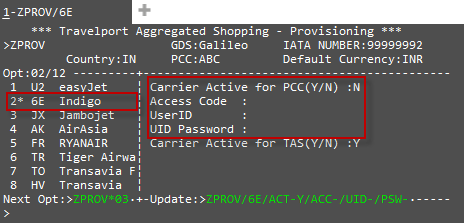
Enter ZPROV/6E/ACT-Y/ACC-AAA111/UID-BBB222/PSW-CCC333, where AAA111 is the Login ID, BBB222 is the Agency ID,and CCC333 is the agent password.
Supported Currencies
IndiGo prices the itinerary in the currency of the city of origin. When looking at shopping results, the currency displayed is the equivalent price in the agent’s local currency to ease comparison between shopping options.
Currency Codes
AED United Arab Emirates (UAE) Dirham
AUD Australian Dollar (as of 07 March 2020)
BDT Bangladeshi Taka
CAD Canadian Dollar
CHF Swiss Franc
CNY Yuan Renminbi
CZK Czech Koruna
EUR Euro
GBP British Pound
HKD Hong Kong Dollar
HUF Hungarian Forint
ILS New Israeli Sheqel
INR Indian Rupee
KWD Kuwaiti Dinar
LKR Sri Lanka Rupee
MYR Malaysian Ringgit
NPR Nepalese Rupee
OMR Omani Rial
PLN Polish Zloty
QAR Qatari Rial
SAR Saudi Riyal
SGD Singapore Dollar
THB Thai Bhat
TRY Turkish Lira
USD US Dollar
Booking Requirements
Direct Payment Carriers require specific types of data in the PNR/Booking File. See Customer Information for Direct Payment Carriers. Individual carriers may also require additional booking data.
|
Customer Information |
Comments |
|---|---|
|
By default, the following titles are supported for Direct Payment Carriers. However, specific carriers may support a different list of titles.
Galileo and Apollo: Enter Z*NT to display a list of titles accepted by a specific carrier. |
|
| Primary Documentation Information (DOCS) |
IndiGo specifically requires the following information in a DOCS SSR:
More information, terminal equivalents, and examples
Travelport+ (1G)
Apollo (1V)
|
|
A minimum of one Phone field is required. |
|
|
A minimum of one email address is required. If multiple email addresses exist, the first email address is sent to the Direct Payment Carrier. |
|
|
A minimum of one Customer Address or Delivery Address is required, including street address, city, state/province, ZIP/postal code, and country code. |
|
|
By default, the following forms of payment are supported for Direct Payment Carriers. However, specific carriers may support different forms of payment.
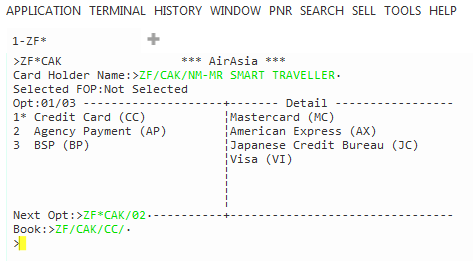
On the Payment tab, the Form of Payment drop-down only lists forms of payment accepted by the selected carrier. If a form of payment was added from a profile, changing the form of payment overrides the profile and changes for the form of payment for this PNR/Booking File only. Galileo Terminal Equivalent: List of Accepted Forms of Payment
ZF* or ZF*Cxx (where xx is the two-letter airline code) to display a list of forms of payment accepted by a specific carrier.
|
|
|
Loyalty Membership (if applicable) |
If applicable, ensure that the loyalty membership information is present before requesting a Fare Shopping search (FS) or Fare Quote (FQ). |
|
Secure Flight Passenger Data (if applicable) |
APIS/Secure Flight Passenger Data is required for all flights with an origin or destination in the United States, as well as for all flights that travel in US air space. |
Optional Modifiers
-
Promotional Codes can be used, if available for the fare, route, and agency.
More Information
The Promotional (promo) Code must specified before end transacting the booking. The code can be added in either:
- The Promotional Code field of a Fare Shopping request.
- A cryptic entry in the pricing request.
- Travelport+ (1G) : FQ-PC<promo code value>. For example: FQ-PCINDIGO83, where INDIGO83 is the Promo Code value.
- Apollo (1V): $B-PC<promo code value>. For example: $B-PCINDIGO83, where INDIGO83 is the Promo Code value.
If discounted fares are available, the pricing response returns the discount as negative fee in the fare breakdown.
-
Frequent flyer (loyalty) memberships are not supported by IndiGo.
-
Both paid and free seats are available. The availability and price of seats varies depending on the passenger's selected fare brand. All seats are displayed as paid seats, with free seats identified by 0.00 price. The Free Seats filter is not available in seat maps for Indigo.
Supported Forms of Payment
See KB0024962: IndiGo - 6E - General Information in the Travelport Knowledge Base for details and instructions.
-
Credit Cards/Debit Cards
Personal cards only, business cards are not supported. Supported cards vary by currency.
-
Diners Club (DN)
-
Mastercard (MC)
-
Visa (VI)
-
American Express (AX)
-
-
BSP Payment
Availability varies by country and agency. Agencies interested in BSP Payment should contact their IndiGo Account Manager.
-
Agency Payment
For Form of Payment, the PCC used for Agency Payment is must be provisioned with the agency account code in the 'Access Code' field of the IndiGo (6E) ZPROV table.
Note: To book with Agency Payment, an agency must be provisioned for Indigo-specific credentials.More Information
The PCC to be used for agency payment needs to be provisioned with the agency account code in the “Access Code” field of the IndiGo (6E) ZPROV table.
When Agency Payment is selected as the Form of Payment:
- The 'Agency ID' and 'Password' fields need to be filled with the agency account code and User ID password, respectively.
- The Agent ID value must be the same as the agency account code specified in the ZPROV table.
- The Password field supports upper case (capital) letters only.
Fees
Segment Fee: None
Credit Card Fee: Yes, depending on carrier setting
CCFD Fee: IndiGo displays a CCFD fee, which refers to the Credit Card Fee/Convenience Fee charged by IndiGo, when applicable.
Confirmation
IndiGo automatically sends email notifications to the traveler for bookings created through Travelport Smartpoint.
Supported Functionality
See IndiGo - 6E - General Information for details.
|
Functionality |
Supported by Travelport | Comments |
|---|---|---|
|
Yes |
||
|
Yes |
|
|
| Seat Maps | Yes | Pre-booking only. |
|
Yes |
Meals Paid Seats Bags with excess weight Priority check-in Lounge |
|
| Other Services |
|
Non-chargeable SSRs |
|
Yes |
|
|
|
Book |
Yes |
|
| Hold | Yes | Supported in specific situations. |
|
Retrieve |
Yes |
|
|
Modify |
Yes |
Modify segments and add ancillaries after booking. Limitations vary depending on Form of Payment. Add Agency FOP only on hold booking. |
|
Cancel |
Yes |
Cancel segments and PNRs/Booking Files. |