direct payment carriers
Transavia
Transavia is supported in Smartpoint as a Direct Payment Carrier.
Airline Codes
- Transavia Netherlands (HV)
- Transavia France (TO)
Contact Information
For further assistance, see the contact page on the Transavia website.
Supported Currencies
EUR Euro
Booking Requirements
Direct Payment Carriers require specific types of data in the PNR/Booking File. See Customer Information for Direct Payment Carriers.
Individual carriers may also require additional booking data.
|
Customer Information |
Comments |
|---|---|
|
By default, the following titles are supported for Direct Payment Carriers. However, specific carriers may support a different list of titles.
Galileo and Apollo: Enter Z*NT to display a list of titles accepted by a specific carrier. |
|
|
A minimum of one Phone field is required. |
|
|
A minimum of one email address is required. If multiple email addresses exist, the first email address is sent to the Direct Payment Carrier. |
|
|
A minimum of one Customer Address or Delivery Address is required, including street address, city, state/province, ZIP/postal code, and country code. |
|
|
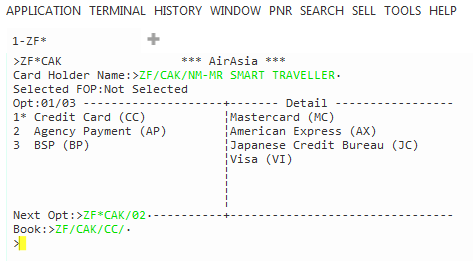
On the Payment tab, the Form of Payment drop-down only lists forms of payment accepted by the selected carrier. If a form of payment was added from a profile, changing the form of payment overrides the profile and changes for the form of payment for this PNR/Booking File only. Credit Card:
Debit Card:
 Galileo Terminal Equivalent: List of Accepted Forms of Payment Galileo Terminal Equivalent: List of Accepted Forms of Payment
ZF* or ZF*Cxx (where xx is the two-letter airline code) to display a list of forms of payment accepted by a specific carrier.
|
|
|
Transavia requires the following information in a DOCS SSR for each passenger:
|
|
|
Loyalty Membership (if applicable) |
If applicable, ensure that the loyalty membership information is present before requesting a Fare Shopping search (FS) or Fare Quote (FQ). |
|
Secure Flight Passenger Data (if applicable) |
APIS/Secure Flight Passenger Data is required for all flights with an origin or destination in the United States, as well as for all flights that travel in US air space. |
Fees
Carrier segment fee: €1.90 globally (HV and TO).
Confirmation
Transavia emails the confirmation to the booking Email Address in the Email To (MT.) or Email From (MF.) field.
Supported Functionality
| Function | Supported |
|---|---|
| Fare Shopping |
Yes Transavia (HV) restriction: Only round trips are available to and from Egypt, Tunisia, and Turkey. |
| Price | Yes |
| Book |
Yes |
| Retrieve | Yes |
| Yes | |
| Ancillary Services |
Transavia (HV) and Transavia France (TO):
|
| Other Services |
Non-chargeable SSRs:
|
|
Modify Modify segments and add ancillaries after booking. |
The following modifications are permitted:
|
|
Cancel Cancel segments and PNRs/Booking Files. |
No Requests for cancellations must be made through the carrier. |
 icon.
icon.