Assisted Ticketing
Voluntary Changes for BSP Agencies
Agents can process voluntary exchanges and set up fares using the Voluntary Change tab in Assisted Ticketing for agencies that use BSP reconciliation.
| Important!
The Assisted Ticketing - Voluntary Change feature does not provide any guarantee against ADMs:
|
Voluntary Change Tasks
Assisted Ticketing supports three tasks for performing voluntary changes. Agents can either:
-
Quote only
Provides a fare comparison between the original fare and a requoted fare. -
Update modifiers
Saves exchange details, such as ticket modifier updates, but does not immediately reissue the ticket for exchange. -
Exchange tickets
Saves exchange details, such as ticket modifier updates, and also reissues the ticket for exchange.
Multiple Reissues
Multiple reissues are supported for voluntary changes in Assisted Ticketing. However, functionality varies by settlement plan.
 More Information
Multiple reissues are supported or voluntary changes in Assisted Ticketing. However, functionality varies by settlement plan.
Smartpoint 11.4.1 and Earlier
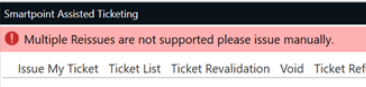
In Smartpoint 11.4.1 and earlier, multiple reissues are not supported. A warning message is displayed.
Smartpoint 11.5 and Later
In Smartpoint 11.5 and later, multiple reissues are supported.
ARC
Fare and tax fields are pre-filled. However, for best practice, always review amounts for accuracy.
BSP
Each time a ticket is reissued after the first reissue, a confirmation message with instructions is displayed.
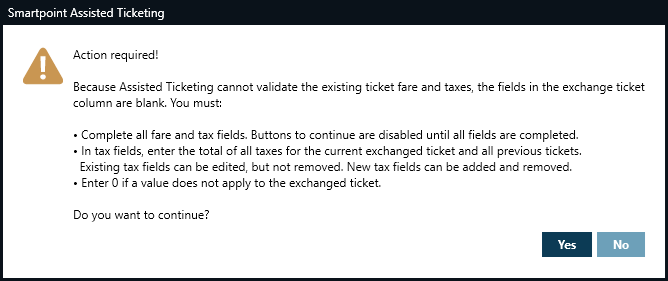
Because Assisted Ticketing cannot validate the ticket fare and taxes, the fields in the exchange column are blank.
-
Complete the fare and tax fields.
-
In the tax fields:
-
Enter the total of all taxes for the current exchanged ticket and all previous tickets. New taxes may be required depending on the details of the exchange.
-
Enter 0 if a value does not apply to the exchanged ticket.
-
-
Click Yes to confirm the conditions for reissue and continue with the voluntary change process.
More Information
For ticket exchange formats:
-
Enter H/TKEX.
-
See Exchange Tickets in the Travelport+ Format Guide.
Known Issues and Limitations
The Q Surcharge collection method is not supported.