NDC FAQs: Reporting and MBOS
These frequently asked questions provide information about reporting and mid- and back-office systems (MBOS).
Refer to the other FAQ topics for information about getting started, shopping and booking, seats, and servicing for NDC content.
|
Question |
Answer |
|---|---|
|
Customers want to issue an invoice for NDC PNRs, including the Service Fees, with totals, terminal, seat information, etc. Are we going to have an outlined process for this? |
The DI. lines and remarks fields can be used for MBOS data; the agent will then have to use their own methods to extract this to create a customer invoice. |
|
In NDC when doing an exchange ticket for the booking, how will this flow through to MBOS? |
In NDC all passengers in the booking are exchanged together and the amount per ticket is reported together for all passengers in the DI lines and not per passenger. We are aware MBOS providers logic is to capture data for one passenger at a time. So MBOS providers will need to have new logic in place to capture this information for all passengers. In NDC if you are only exchanging the ticket for one passenger, then that passenger needs to be split out on his/her own PNR. |
|
When I do a void, cancel, or refund, will these actions be automatically sent to by MBOS to update it? |
No, the MIR is not automatically updated with these modifications. A DI. line will be added to the PNR with these actions. Keep in mind that a PNR with no segments will go into a past date status and a MIR cannot be generated. A workaround is to ensure you input retention lines in the PNR before doing these actions to keep the PNR alive so you can re-send the MIR. |
|
How can I see a list of all the PNRs I’ve created for NDC? |
Note: The NDC segment status displays as HK after February 5, 2026. Bookings made prior to this date may display a ZK status. The ZK status will change to HK if the segment is modified. For more information, refer to NDC segment status. To view a list of all NDC PNRs with a segment date of March 25, in a terminal window, enter format:
To restrict the list to a specific carrier, enter format:
For more format options for Travelport+, refer to Formats for List Display.
|
|
Can NDC create GDS booking file with passive segment for mid-back-office integration purposes? |
Any NDC bookings done through Smartpoint Cloud or the Flight Search plugin will have an HK status code. |
|
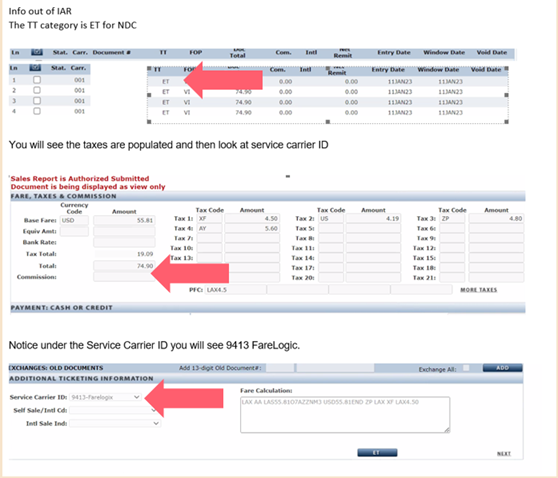
If ARC, what would identify an NDC ticket from other ARC tickets? |
The Airline Ticket stock form code on your ARC report would be different to your agency ticket stock as in NDC the airline is issuing the ticket and the ticket number would be from AA’s ticket stock, not your agency stock. This could be different than your existing direct carrier fulfilment processes. Below is an example of the IAR report:
|