Reordering Segments
Reorder and Re-Store Fares: Apollo Only
Smartpoint does not currently offer automatic segment placement for Apollo (1V). By default, new or rebooked segments are placed at the end of the PNR.
Because Apollo's default order can result in segments that are no longer in chronological order, you can enable functionality to reorder segments and/or restore fares. You can enable Smartpoint to:
- Automatically re-store fares as part of rebooking from a Low Fare Shopping response for either branded or unbranded fares.
- Reorder segments and/or re-store fares using commands.
- #RO Reorders the itinerary chronologically according to a precedence logic between segment types.
- #RS Re-stores the stored fares.
- #RORS Reorders the itinerary in the PNR and re-stores the stored fares (ATFQ).
Tip! Agencies that use the PNR Assist component can also reorder segments from Auto-Benchmarking. See PNR Assist Help for details.
Enabling and Disabling Reorder and Re-Store Fares
By default, Reorder and Re-Store Fares functionality is disabled. However, you can enable this functionality at any time.
To enable Smartpoint to reorder segments:
Enter #RORON.
To disable Smartpoint to reorder segments:
Enter #ROROFF.
Re-Storing Fares from Rebooking
If Reorder and Re-Store is enabled on Apollo, a message to reorder displays automatically when you rebook either branded or unbranded fares in a Fare Shopping (FS) flow.
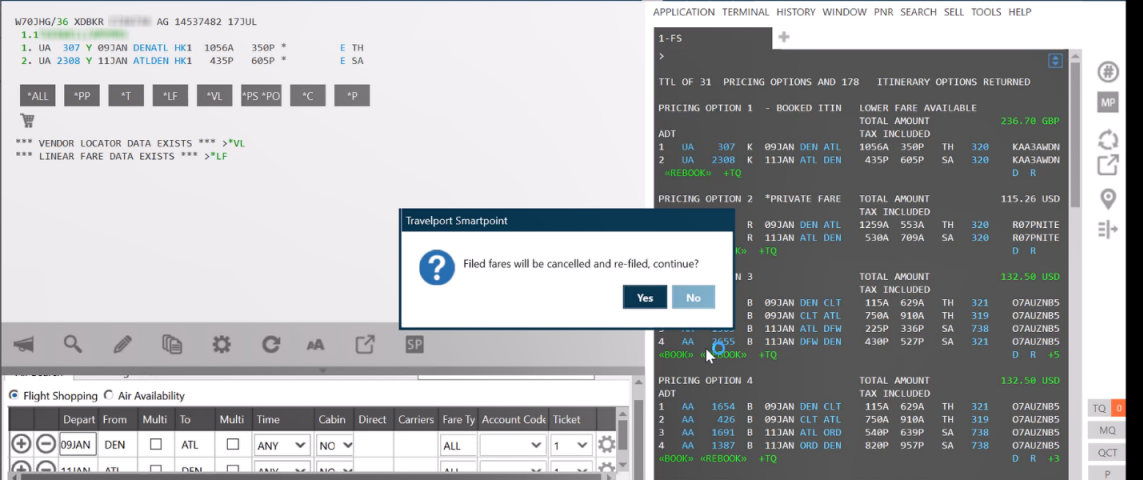
You can either:
- Click No to continue stop rebooking.
- Click Yes to approve re-storing the invalidated fares and reordering segments, if applicable.
More Information
Smartpoint recreates (re-stores) the current stored fares in the PNR by:
- Determining the stored fares related to the segments that are going to be rebooked.
- Retrieving the original pricing entries used to store the fare (*T).
- Determining which stored fares need to be re-stored and which stored fares are not going to be replaced by rebooking.
- Reading the stored fare response to extract the price as booked ($B) from the ATFQ lines.
- Canceling the segments that are going to be rebooked and selling the new segments.
- Reordering the itinerary (following the same logic as the #RO function).
This command reorders the current itinerary based on:
- Departure time (standardized to UTC to handle multiple time zones in the itinerary).
- Precedence of segments based on type.
- Departure time.
If the reordered itinerary contains any open-jaw trips, Smartpoint then creates an ARNK segment between the segments in the open-jaw trip.
- Recreating the previous stored fares by retrieving the pricing entries (*T).
- Updating the segment numbers in the price entries to reflect the current position of the segments in the PNR.
- Recreating the stored fares in the same order as they were before in the *LF section.
- Storing the rebooked fare.
- If the rebooked segment did not have any previous stored fare related, the new stored fare is added after the existing stored fares.
- If the rebooked segment had a previous stored fare related, the new stored fare created in the same position as the original stored fare.
Reordering and Re-Storing with Commands
There are three command options for reordering segments and/or re-storing stored fares.
|
Command |
Description |
|---|---|
|
#RO |
Reorders the itinerary chronologically according to a precedence logic between segment types. More Information
This command reorders the current itinerary based on:
If the reordered itinerary contains any open-jaw trips, Smartpoint then creates an ARNK segment between the segments in the open-jaw trip. |
|
#RS |
Re-stores the stored fares. Important! You can use this command when stored fares (ATFQ) are invalidated because segment positioning has changed. More Information
Smartpoint recreates (re-stores) the current stored fares in the PNR by:
|
| #RORS |
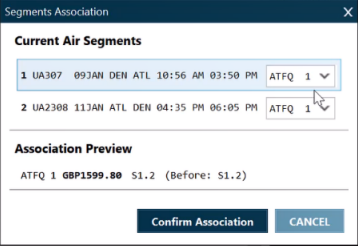
Reorders the itinerary in the PNR and re-stores the stored fares (ATFQ). #RORS is a combination of #RO and #RS. However, you can set the relationship between segments and stored fares using the Segments Association screen. More Information
After you enter the #RORS command, a Segments Association pop-up screen is displayed.
In the Current Air Segments section:
The Association Preview section provides:
Click Confirm Association to reorder the itinerary and re-store the fares in their new positions. |
Known Issues
Re-order and re-store automatically adds ARNK segments when Smartpoint detects an open jaw trip in the itinerary. However, there are also several known issues in which additional ARNK segments may be created when an itinerary is reordered. ARNK segments that are not applicable to an open jaw trip can be deleted.