What's new
Smartpoint Cloud is in a Early Adopter phase. If you are interested in participating, please contact your Travelport representative.
Refer to NDC airline capabilities for instructions on how to access information about each NDC airline's capabilities.
Learn in the flow of work
Introducing learning in the flow of work, get the information you need, when you need it. A combination of flows guide you step-by-step through a process, while videos, articles, smart-tips and pop-ups help you when you need it most.
Learn to Cloud training available
Learn to Cloud provides step-by-step instructions for using Smartpoint Cloud.
Release 4.37.2: October 15, 2026
-
United Airlines capabilities updates
-
Upsells returned on reference price.
-
Order divide supported for both held and ticketed bookings.
-
Enable modify ticket to hold.
-
-
Ability to filter search results by refundable fares for both traditional and NDC.
-
Ability to cancel and refund a partially flown NDC itinerary, where supported by airline.
Release 4.37: October 1, 2026
-
Effective October 1, Iberia’s Basic Fare family is distributed exclusively through NDC for points of commencement in Mexico, Morocco, and Senegal.
-
Removed the upsell and brand-limiting constraints for GDS content so all available brands display when View more brands is selected.
-
Improved extras navigation so traveler information is not entered until the Review and confirm screen, not during search or price.
-
Enhancements to seat maps, including addition of amenities, differentiated seat types, indicated extra legroom seats, exit rows display the extra space, represent angled or reverse facing seats.
-
Quick access to APIS / Security document forms for post-booking traveler modification via an Edit travelers action from the Travelers menu, and a security documentation status displayed on every traveler card.
-
Ability to select stop preferences (nonstop, one stop, or two stops) in the GDS Exchange search.
-
Improved Price Details component by providing a complete and accurate view of all booking-related costs in a single location.
Release 4.36: August 27, 2026
-
In interactive availability, click the aircraft type to display a seat map preview. Click the Go back button to return to the interactive availability results. Available for GDS flights only.
-
For traditional offers only, a Primary traveler contact information section (optional) has been added to the Review and Confirm panel. When multiple passengers are in a booking, these fields identify which passenger should be contacted with flight information.
-
New options on search panel:
-
If cabin class selected, there is an option to select Preferred with upgrade, which returns the cabin class selected plus higher brands.
-
The option to Exclude basic fares is available when Traditional or All is selected. This option filters out basic fares from the search results.
-
-
Ability to quote exchanges without applying taxes during the quoting process.
-
On the search results panel, when multiple offers have the same carrier and price, one option displays in the result list. View similar options by clicking the +X more options link below the first offer displayed. To display all flights, apply a sort filter (for example, sort by departure time) to expand all flight options.
-
Ability to filter search results by refundable fares.
-
A country code field is available when entering phone numbers, rather than including the country code in the number field. This field is optional by default but is required for Delta Air Lines (DL).
-
Modify after travel commencement available for Malaysian Airlines (MH) NDC bookings.
-
Order divide, including multiple divides of the same booking, available for British Airways (BA).
Release 4.35: July 16, 2026
-
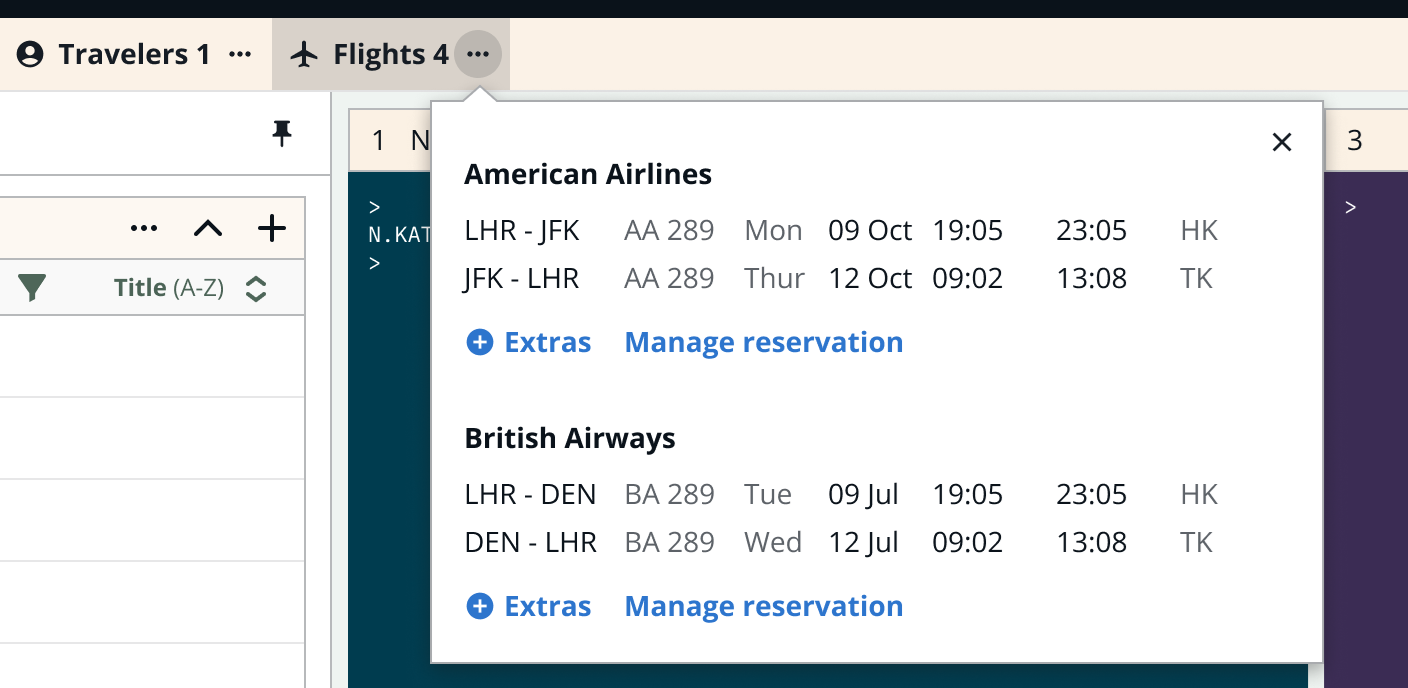
Navigation has moved from the side to the top to provide wider panels and to align with the natural workflow of managing booking files. Navigation is organized around the active booking file.
-
Top navigation with no active booking file

-
Menu with an active booking file

-
To view a summary for each section, hover or click the … icon.
-
-
Saudia Airlines (SV) supports manual reprice.
-
United Airlines (UA) supports upsells at price.
-
United Airlines (UA) supports the ability to modify a ticketed booking and put it on hold.
Release 4.34: June 18, 2026
-
Single log-in to Smartpoint Cloud using Okta.
-
Ability to override currency in Smartpoint Cloud for both GDS and NDC search and modify workflows.
-
Ability to search different cabin preferences per leg within a single itinerary.
-
Added INE passenger type code to NDC search enabling airlines to apply tax exemptions at price, where supported by carrier.
-
Removed the brand limit for NDC content, displaying all brands returned by the API.
-
Manual exchanges capabilities now include ticket only and multi-offer.
-
Exchange Price Quote release enables the processing of multi-offer booking files, supports booking files that have been partially used, and allows for handling multiple exchanges. It also introduces an extended payment option within the credit card form of payment and the eligibility check when a ticket-only scenario is used.
LOT Polish Airlines NDC content: June 15, 2026
LOT Polish Airlines (LO) NDC content is available as outlined in NDC content by country. Features and known issues are detailed in the NDC LO article.
Release 4.33: May 21, 2026
-
Ability to complete Air Canada Flight Pass bookings in Smartpoint Cloud. See AC NDC knowledge article for detailed information.
-
Improved Extras catalog navigation both prior to booking and post booking.
-
Ability to set a default PCC in SPC and emulate another PCC in same SPC work area.
ITA Airways NDC content: May 5, 2026
ITA Airways (AZ) NDC content is now available as part of the Lufthansa Group as outlined in NDC content by country. See the NDC LHG knowledge article for additional information.
Royal Jordanian NDC content: April 30, 2026
Royal Jordanian (RJ) NDC content is available as outlined in NDC content by country. Features and known issues are detailed in the NDC RJ article.
Saudia Airlines NDC content: April 27, 2026
Saudia Airlines (SV) NDC content is available as outlined in NDC content by country. Features and known issues are detailed in the NDC SV article.
Release 4.32: April 23, 2026
-
Manual exchanges are now available for BSP customers in Smartpoint Cloud.
-
Traveler assistance can be added to Malaysian (MH) NDC bookings post book and post ticket.
Release 4.31: March 26, 2026
-
In SPC, NDC Air segments can be added to booking files that contain only hotel/car reservations, or both.
-
Exchange Price Quote enhancements including enhanced ticket designator and price modifier capabilities, a simplified payment experience for netting scenarios showing only final refund/charge totals, and standardized error handling across the entire exchange flow.
-
Display the remaining booking time countdown in the Extras catalog, synchronized with the timer on Review and Confirm.
Release 4.30: February 26, 2026
-
Bags can now be booked based on weight or quantity, per carrier support.
-
Agents can enter a waiver code for voluntary changes to QF and AA reservations.
-
Additional pricing modifiers are available in Exchange Price Quote.
-
Ticket change or refund eligibility is displayed in Tickets section of graphical booking file.
Flight disruption status change: February 5, 2026
As of February 5, 2026, all new or modified confirmed NDC bookings will have an HK segment status. Prior to February 5, agencies could opt in to receive NDC bookings as HK status, rather than the default ZK status.
Important: Agencies using automation to service bookings should review their workflows to ensure compatibility with the new process.
Avianca (AV) suspending NDC content access: February 1, 2026
From February 1, customer access to Avianca NDC content is discontinued. All Avianca content will be centralized in EDIFACT.
Release 4.29: January 29, 2026
-
As the most common search scenario is round trip, the Search panel now populates the segment one origin as the segment two destination.
-
Early adopter release of Exchange Price Quote which enables the processing of GDS automated exchanges when an itinerary is already modified.
-
User can display an NDC booking in the graphical booking file while working a queue, and exit queue to complete actions such as ticketing and adding ancillaries.
 View release notes prior to 2025
All Nippon Airways NDC content: December 17, 2025
All Nippon Airways ANA (NH) NDC content is available in additional countries. Features and known issues are detailed in the NDC NH article.
Release 4.28: December 11, 2025
-
Search preferences and modifiers are grouped for easier access.
-
After flight selection, the Extras panel now includes an Other ancillaries category, which contains traveler services offered by the airline.
-
The Extras panel has been enhanced for consistency across all ancillaries.
-
Upsell options for Air India NDC display at the Review and confirm stage prior to booking.
-
Prior to this release, Ticketing Mandatory (TM) and Document Mandatory (DM) custom check rules were applied inconsistently and would block the book and hold workflow. With this release, when the Agency Account Table (AAT) specifies that TM and DM rules are mandatory at ticketing or itinerary issuance, users are able to book and hold without fulfilling the rules, which may be required at a later stage of booking. Note: TM and DM rules are configured via the RULE command in the AAT.
New NDC airline schedule change process
The new NDC Schedule Change process introduces a streamlined approach for handling flight disruptions. These enhancements aim to reduce manual intervention and improve the overall efficiency of disruption handling for travel agents and agencies. See NDC Schedule Change process for requirements and steps to action NDC schedule changes.
All Nippon Airways NDC content: November 20, 2025
All Nippon Airways ANA (NH) NDC content is available to limited agencies in Indonesia. Additional countries and agencies will soon follow. Features and known issues are detailed in the NDC NH article.
Etihad Airways NDC content: November 17, 2025
Etihad Airways (EY) NDC content is available as outlined in NDC content by country. Features and known issues are detailed in the NDC EY article.
Release 4.27: November 6, 2025
-
OB Fees (carrier ticketing fees for credit card use) are automatically recalculated during ticketing when the form of payment changes after booking hold (post end transact).
-
Paid meals and traveler assistance can be booked in NDC reservations before and after booking, where supported by carrier. See NDC capabilities by airline for specifics
-
Flights that have already been flown are marked with lighter and strike through text in both the Booking View Flight list and the graphical booking file. These changes allow users to easily identify past date flights. When viewing a booking terminal view, flown flights are not listed, which is consistent with Smartpoint Desktop.
-
Agencies can limit terminal functionality, restricting agents to graphical only in Smartpoint Cloud, by using a new STD setting.
Release 4.26: October 2, 2025
-
October 9, 2025: Easy Pay is supported as a payment option for all six Lufthansa Group airlines – Air Dolomiti, Austrian Airlines, Brussels Airlines, Discover Airlines, Lufthansa, and Swiss International Airlines. Easy Pay can be selected from the credit card type list as a payment method.
-
Free meals and free traveler assistance can be booked in NDC reservations before booking, where supported by carrier. See NDC capabilities by airline for specifics.
-
Enhanced display of Electronic Miscellaneous Documents (EMD) to clearly see if one EMD has been issued for multiple paid services or one EMD per paid service. Prior to this release, each ancillary had a corresponding EMD; these EMDs displayed as separate lines in both the review and confirm display as well as DI lines.
With this release, some providers are combining ancillaries with an offer. These providers then either issue a single EMD for all ancillaries together (ancillaries do not have individual pricing) or can issue multiple EMDs, one for each ancillary.
-
For GDS bookings, agents can now complete the manual exchange process in the graphical interface.
-
Agents can now view and cancel unpriced GDS segments in the graphical booking file.
Air Canada NDC content: October 1, 2025
Air Canada (AC) NDC content is available as outlined in NDC content by country. Features and known issues are detailed in the NDC AC article.
Release 4.25: September 4, 2025
-
Agents can accept and reissue tickets after involuntary change (OCN), subject to NDC carrier capability.
-
Ticketing arrangement now displays both local and UTC (Zulu) time on the Booking details panel by hovering over the informative
 icon.
icon.
TAP Air Portugal NDC content: August 21, 2025
TAP Air Portugal (TP) NDC content is available as outlined in NDC content by country. Features and known issues are detailed in the NDC TP article.
Release 4.24: August 7, 2025
-
The fare rules menu is available from the fare shop results in terminal.
-
Agent can create a new booking file in Smartpoint Cloud graphical view from the Booking menu, provided the active booking file is not in a queue.
-
Traveler names can be added when selecting priority boarding. Prior to this release, traveler names had to be entered prior to search.
-
Baggage allowance displays in the NDC Modify air search response screen and the NDC Modify Review and Confirm screen, if supported by airline.
Release 4.23.3: July 31, 2025
-
Prior to this release, NDC segments only displayed with a status of ZK. With this release, agencies can choose to have NDC segments display with a status of HK. Agencies must contact their Travelport representative to opt in. If your agency does not opt in, NDC segments will continue to display a status of ZK.
Agencies who opt in for the NDC status of HK may need to update back office processes. The ZK to HK change will be important for future Order Change Notification features related to flight disruptions and other airline notifications. For more information, refer to NDC segment status.
In the terminal view, an N displays at the end of an NDC segment.
-
Finnair (AY) NDC supports bags.
-
Before booking:
-
Hold the bags and flight selection
-
Instant ticket bags and flight selection
-
-
After booking:
-
Add bags to held booking
-
Add bags to ticketed booking and pay for them
-
-
Release 4.23.2: July 24, 2025
New private fare qualifiers are available: Adoptant, Entertainment, Humanitarian, Semideferred Cruise Tour Operation, TMC Corporate. No specific PTC is required for these qualifiers. However, these qualifiers depend on carrier support.
Easy Pay update: July 17, 2025
IATA Easy Pay (EP) is available as a form of payment for ticketing and ancillaries. Select Credit / Debit card as the payment method, then choose Easy Pay from the Card type list.
-
Available for Singapore Airlines (SQ) and Qatar Airways (QR) on June 26, 2025.
-
Available for Qantas Airways (QF) and Emirates (EK) on July 17, 2025.
Release 4.23: July 10, 2025
-
Upsell and/or fare attributes (e.g., rebooking, refund, baggage) display in the brand details card, if sent by the airline.
-
Seat maps display as part of the Extras catalog, allowing easy navigation to other ancillaries.
-
Agent can hold seats and ancillaries on ticketed bookings, if allowed by the airline, in addition to held bookings.
-
For departures from India, the Goods and Services Tax (GST) information can be added or deleted in the graphical booking file.
-
Add Fiscal ID in Traveler information when booking or exchanging an international ticket in an Argentina, Bolivia, Ecuador, or Peru PCC.
-
Enhanced hotel segment rate details (refundable and commission) display in the booking file.
EVA Air NDC content: June 19, 2025
EVA Air (BR) NDC content is available as outlined in NDC content by country. Features and known issues are detailed in the NDC BR article.
Release 4.22: June 12, 2025
-
Ticketing Time Limit now displays both local and UTC (Zulu) time on the Review and confirm panel by hovering over the informative
icon. -
The Summarized (short) or All (long) fare rules option are now available from the confirmation screen's View rules link. At this time, only summarized (short) fare rules are available for NDC flights.
-
The exchange process has been updated to clearly identify which exchange options are available for a booking. To begin an exchange, open the booking file and click the Change button. If the booking file is not eligible for exchange (for example, the booking file is not ticketed or the coupons have a status other than OPEN/ARPT), then a message displays that the flights cannot be exchanged.
Air India (AI) NDC content: June 4, 2025
Air India NDC content is now available through Travelport+ (1G) as outlined in NDC content by country. Air India NDC content requires registration. Features and known issues are detailed in the NDC AI article.
Cathay Pacific (CX) NDC content: June 2, 2025
Cathay Pacific NDC content is now available through Travelport+ (1G) as outlined in NDC content by country. Cathay Pacific NDC content requires registration. Features and known issues are detailed in the NDC CX article.
Release 4.21: May 15, 2025
-
A corporate agreement ID and frequent traveler number can be added during booking on the traveler information panel. Prior to this release, this information could only be added using terminal commands.
-
When viewing flight rules, a drop-down option lets you choose to display Summarized (short) or All (long) fare rules. At this time, only summarized (short) fare rules are available for NDC flights.
-
Baggage allowance display has been updated to display consistent information in the flight search results, review and confirm, and graphical booking file sections.
-
Additional GDS flight offers (up to 13 segments) can be added to an existing GDS-only booking file, allowing you to create multi-offer itineraries within the same booking. On the Review and confirm panel, a message specifies that the newly chosen flights are being added to the existing booking file. Additional GDS offers cannot be added to a booking file with NDC or non-air content.
-
When completing the traveler and payment information on the Review and Confirm page, if you decide to view or select ancillaries, the traveler information persists. Prior to this release, you were prompted to save traveler details first or they would be lost.
-
If the form of payment is added to the booking file before flight search (for example, from a profile or terminal entry) and if the form of payment is later changed on the review and confirm screen for an NDC offer, the offer is repriced to ensure any fees associated with the chosen form of payment are correctly calculated. For example, if a credit card was initially added to the booking file and the form of payment changed to cash during the review and confirm screen, any OB fees initially calculated for a credit card would no longer apply to the booking.
-
Malaysia Airlines (MH) NDC offers can be manually repriced.
Release 4.20: April 24, 2025
-
Enter an NDC promo fare code in Search to receive and book offers that are part of a promotion being run by the airline.
-
After selecting the last flight and before booking, you can add extras, depending on carrier support. This page also displays itinerary details.
-
Air search results can be filtered by layover duration.
-
For traditional flights, you can display a summary (short) or all (full) fare rules from the flight details pane in shopping results. At this time, only a summary (short) fare rules are available for NDC flights.
-
For flight search, the content source value (Traditional, NDC, or All) defaults to the last content source selected, even when the panel is refreshed.
Easy Pay available: April 10, 2025
IATA Easy Pay (EP) is available as a form of payment for ticketing and ancillaries for Air France (AF), Air India (AI), Finnair (AY), and KLM (KL). Select Credit / Debit card as the payment method, then choose Easy Pay from the Card type list.
NDC SAS Scandinavian Airlines (SK) seats
Seats can be added to NDC SAS Scandinavian (SK) orders for the following flows:
-
pre-booking and hold seats and flights
-
pre-booking and ticket seats and flights
-
post-booking to a held booking
-
post-booking to a ticketed booking
Note: There is currently a limitation with adding SK seats post booking. The agent can book (commit) seats one leg at a time. Agents can select seats for some or all of the travelers on that leg.
Release 4.19.2: April 3, 2025
-
Qantas (QF) supports cancelling/modifying bags on held and ticketed bookings.
-
Lufthansa Group (LHG) supports cancelling/modifying bags on ticketed bookings only, as per the carrier business rules.
Release 4.19: March 20, 2025
-
Air search results can be filtered by connecting airport.
-
When searching for NDC flights and specifying a private fare code in the search panel, select an NDC offer, then hover over the new information (
) icon for fare type to display the type of private fare used for that offer, if it is available. -
Fare Shop as Booked (FS) takes in account all the segments in the booked itinerary. The segment selection modifiers let you shop by a single segment (FS/S#), a range of segments (FSS#-#), or specific segments (FSS#.#).
-
When canceling or modifying seats or bags after a held or ticketed booking, the confirmation button label has changed to Confirm changes.
-
Prior to this release, GDS flights could be canceled or voided using the Change button. With this release, cancel and void is accessed via the new Cancel flights button and a new workflow.
-
Agencies can restrict NDC ticketing at the PCC level based on the AAT setting TKLS - Electronic Ticketing. Set this field is set to N to prohibit an agency from issuing electronic tickets. When an agent in a PCC that prohibits ticketing tries to ticket, the following message displays: You do not have ticketing permissions. The agent only has the option to Hold; the ticket option is hidden.
-
Canceled DI remarks are available in booking file history.
NDC SAS Scandinavian Airlines (SK) bags
Adding bags is now supported for Scandinavian Airlines (SK) NDC orders.
Release 4.18: February 20, 2025
-
Preferred seats are indicated by a blue seat (
 ) icon on seat maps.
 -
When NDC carriers allow bags to be selected prior to booking, the Extras panel displays after the last flight is chosen for you to add bags. The new Bag option displays along with the Seats and Add-ons options.
-
When NDC carriers do not support bags, an error message displays and the Bag option in the Extras panel is grayed out.
-
The Help and Settings icons have moved from the lower left sidebar to the upper right corner of the window.

-
Amenity icons display in the flight details panel below each flight's details. Hover over an amenity for details.
-
When searching for hotels, the map displays the lowest rate for a property, or, if multiple properties are in the same general location, the map displays the number of properties available. Hover over a single hotel pin for more information. Click on a pin with multiple properties to zoom in on that location and display the individual hotel pins.
-
After booking a hotel, the graphical booking file displays additional information about the booking, including price details, form of payment used, payment type (i.e., prepaid, deposit, guarantee rate), frequent guest number if used, and the pin code for booking.com reservations.
Finnair NDC content: February 2025
Finnair (AY) NDC content is now available through Travelport+ (1G) as outlined in NDC content by country. Features and known issues are detailed in the NDC AY article.
United Airlines NDC in APAC
United Airlines NDC content is available in additional APAC countries as outlined in NDC content by country.
January 28, 2025: Multi-factor authentication
Multi-factor authentication (MFA) is now integrated into the login process for this product.
What is MFA? It is a two-step verification process designed to keep your account safer. The new, secure login experience adds an extra layer of protection to your account. In the future, this update will simplify password recovery and improve self-service and registration.
As part of this process, a code is sent to your associated email address to authenticate your login. With MFA, your data and information are well-protected.
Discover Airlines NDC content
Discover Airlines (4Y) NDC content is now available as part of the Lufthansa Group. See the NDC LHG knowledge article for additional information.
Release 4.17: January 23, 2025
-
When searching for flights using a search modifier (e.g., carry-on bag), the modifier used in search cannot be unselected in the filter panel.
-
Flight amenities (such as seat layout, power, food, beverage, and entertainment) display when viewing brands and when comparing flights.
-
Agents can modify and cancel seats for British Airways (BA) prior to booking.
-
Bags can be canceled post booking for Emirates (EK) and Qantas (QF).
-
Bags can be modified prior to booking for Air France/ KLM (AF/KL), British Airways (BA), Iberia (IB), Qantas (QF), Singapore Airlines (SQ), United Airlines (UA).
-
Graphical booking file displays ticket information for canceled segments and offers.
-
When a passenger type code modifier is used in a fare shop terminal entry, the pricing options that are returned are specific to the PTC requested.
Release 4.16: December 12, 2024
-
Choose a preferred language for graphical menus and labels in General Settings. German, Italian, Portuguese, Russian, and Korean have been added as supported options. The terminal windows are not translated.
-
Search results can be filtered up to a maximum price.
-
Enhanced Hotel search with additional filter options.
-
When working a queue in terminal, the queue title, number, and category display in the interactive booking file.
-
NDC carrier-specific updates:
-
Booking bags and seats in the same transaction is available for Air France, Iberia, KLM, and United Airlines before booking, after booking, and after ticketing, as per each carrier's NDC business rule.
-
Agents can cancel bags pre-end transaction for Qantas (QF) and Air France/KLM (AF/KL) NDC.
-
Paid seats are supported for Malaysia MH NDC offers during booking and post booking.
-
NDC order divide is supported by Malaysia Airlines and SAS Scandinavian Airlines.
-
Release 4.15: November 21, 2024
-
Booking bags and seats in the same transaction is available for British Airways (BA), Qantas Airways (QF), Singapore Airlines (SQ), and Lufthansa Group (LH) before booking, after booking, and after ticketing, as per each carrier's NDC business rule.
-
Bags can be canceled before booking for British Airways (BA), Iberia (IB), Singapore Airlines (SQ), and United Airlines (UA) NDC offers.
-
Search results can be filtered by low CO2 emissions and popular preferences.
-
When creating a new review booking file remark, default values of next day, current time, queue 12, and current PCC are pre-populated and can be changed as needed. You can also assign a queue category. Review booking file remarks can be assigned to a queue category.
-
Invoice remarks has new types available for back office accounting field (X*), canned remarks (CR), and design your own (DYO).
-
During hotel search, you can view hotel details, including images, ratings, amenities, description, and contact information.
-
Fare shop details display in terminal view.
-
When fare shopping in terminal, additional modifiers are available, such as direct flight, preferred/excluded carriers, permitted/restricted airports/cities, and departure time ranges.
-
When fare shopping in a terminal window, the active cursor automatically moves to the top of the window after a terminal entry. Press the tab key to move the cursor to the bottom of the list.
-
Interactive fare shop displays time in 12- or 24-hour clock depending on AgencyClock setting in the AAT.
-
From the queues panel, you can choose to begin working a queue from a specific booking file, rather than only from the first booking file in the list.
-
OSIs with SMNAME and SMNLOC are required to use marine fares. When these OSIs are added to the booking file, they no longer display in the Corporate ID section of the flight search panel. They remain as part of the booking file and display in the Other service information section of the graphical booking file.
-
Quickly access notepad, invoice remarks, and OSI messages in the graphical booking file by selecting the green links when viewing the booking file in a terminal window.
-
Manual reprice is now available for American Airlines, British Airways, Emirates, Iberia, Lufhansa Group, Qantas Airways, and United Airlines NDC bookings.
-
NDC carrier-specific updates:
-
Qatar Airways seats are available during booking and after booking.
-
Iberia priority boarding can be added after ticketing.
-
Iberia NDC: November 11, 2024
Iberia NDC content is available through Travelport+ in additional countries as outlined in NDC content by country.
Release 4.14.2: November 7, 2024
Seats can be selected after choosing the last flight segment (subject to carrier support) through the Extras catalog panel. The Extras panel is used both before and after ticketing for NDC and traditional (GDS) carriers that support seats.
Malaysia (MH) and Emirates (EK) NDC: November 5, 2024
Malaysia Airlines and Emirates NDC content is available through Travelport+ in additional countries as outlined in NDC content by country.
Release 4.14: October 24, 2024
-
Flight responses can be filtered by airport, non-stop only, and departure and arrival time window.
-
OSI, associated remarks, and Review Booking File remarks can be edited in the graphical booking file.
-
Name remarks can be added to GDS bookings.
-
A new terminal entry form is available for air availability search.
-
You can switch between different work areas using the drop down list in the upper right corner of the graphical window.
-
For interactive fare display, the line numbers for North American fare display are interactive.
-
Enter SON in a terminal window to launch the graphical Sign in dialog.
-
Enhance Hotel search by allowing agents to filter and sort hotel properties
-
Credit or debit card information can be added to a car booking.
-
Trip Quote allows quotes to be retrieved via a reference number.
-
Profile information can be displayed in a more user friendly format by selecting Enhanced view in General Settings.
-
NDC carrier updates
-
Iberia (IB) allows seats to be modified and canceled before ticketing.
-
Booked bags for NDC offers can be canceled for Lufthansa Group (LH) after ticketing.
Important: Airlines do not offer refunds for canceled bags.
-
Bags can be added to Air Dolomiti (AN) NDC offers.
-
Bags can be added to United Airlines (UA) NDC offers before and after ticketing.
-
Release 4.13.1: October 3, 2024
Choose a preferred language for graphical menus and labels in General Settings. English, French, Japanese, Simplified Chinese, and Traditional Chinese are currently supported. The terminal windows are not translated.
Release 4.13: September 26, 2024
-
Traveler names can be removed from a booking prior to hold or ticket or by right-clicking on the name in a terminal window and selecting Remove travelers.
-
Agent can use waiver codes in a search following an involuntary change (OCN) for QF and AA bookings.
-
For American Airlines, when a waiver code is entered in the Air Modify panel, the search results have the waiver code applied.
-
For Qantas, the waiver code is also entered in the Air Modify panel but the search result prices do not reflect the waiver code. Instead, the waiver code is applied at the review and confirm page at this time.
-
-
Multiple order divides are available for some airlines.
-
When you select the Sign Out button, you are logged out of Smartpoint Cloud and signed out of the Travelport+ host. If you have unsaved changes in a booking file, a warning displays for you to finish and save the changes or ignore and discard the changes before you can sign out.
-
Once flights are selected, the Fare Details section in the Review and confirm panel now displays both city names and airport codes, which is useful for cities having more than one airport.
-
In the Flight search panel, the cabin class modifier has moved from the bottom of the panel to below the Airline field.
-
If a billing address is already in the booking file and if credit or debit card is chosen as form of payment, the billing address option of Same as on the booking file is selected by default. To use a different billing address as the one on file, unselect this option to display the billing address fields to enter a different address.
-
A new Terminal entry form (
 ) icon is available for selling passive, active, and open segments. This panel can also be opened by entering #SELL in a terminal window.
 -
Additional modifiers are supported for fare quote (FQ) and fare quote best buy (FQBB) entries when displaying brands.
-
From fare shop results in terminal, select an aircraft type to preview a seat map. Seats cannot be booked in this view.
-
From fare shop results in terminal, you can display fare rules.
-
When a segment contains a change of plane, the plane change location and notice displays in the terminal's interactive booking file beneath the affected segment.
Release 4.12: August 29, 2024
-
Add priority boarding to an Iberia NDC offer prior to booking. When priority boarding is added, you must ticket (not available for book and hold). Important: Traveler details must be added using a terminal entry (N.) before searching for a flight in order to add priority boarding during booking.
-
In the graphical booking file:
-
When an NDC booking includes commission, the commission displays on the Review and Confirm screen in the Fare Details section. Commission also displays on the Ticket Details screen (if the offer has been ticketed).
-
For NDC bookings, select the ticket number link to display ticket details.
-
OSI and Review Booking File remarks can be deleted.
-
When creating a notepad remark, you can also enter qualifiers defined by your agency.
-
The customer ID number displays in the booking information details.
-
India Good and Services Tax (GST) SSRs (GSTN, GSTA, GSTP, GSTE) can be added and displayed in the graphical booking file.
-
-
When viewing a booking file in a terminal window, you can open associated and unassociated remarks by expanding the remarks section and selecting the green label text to open that specific remark in the graphical booking file.
-
Credit card security code is mandatory for Air France, KLM, and British Airways in graphical bookings. When the security code is not entered for those airlines that require it, you are prompted to enter it before ticketing.
-
Agents can remove bookings from a queue.
-
From interactive Fare Shop, add an option to Trip Quote by selecting +TQ.
-
From interactive Fare Shop, when FS is entered, if a booking file is already retrieved, the response is based on the booked segments. From the response, you can choose to store the existing fare (if the lowest fare is already selected). Select Rebook to replace the currently booked segments with a different flight option.
-
From interactive Fare Quote Best Buy (FQBB) and Fare Shop, you can view and book specific brands.
-
Class of service and fare basis displays when viewing brand details for NDC bookings.
-
Agents can modify a SAS Scandinavian Airlines (SK) booking after travel commencement.
-
For SAS Scandinavian Airlines (SK) and Qatar Airways (QR) bookings, agents can manually reprice the offer to extend the fare guarantee period and keep the reserved inventory. The offer price may have changed from the original booking; therefore, the agent will need to accept any changes.
-
NDC ancillaries
Release 4.11: August 1, 2024
-
The graphical My queues panel lets you monitor, sort, and manage bookings files. Use the Queue options section of Settings to specify which queues you want to monitor, as well as the refresh (polling) interval.
-
Terminal font size can be changed through Settings.
-
Unassociated and invoice remarks can be edited and inserted from the graphical booking file.
-
The Void option is available from the Change link in terminal after changes are made to an existing fare.
-
The DV button retrieves a child or parent booking file from the interactive booking file in the terminal display.
-
Fare Shop as booked is available in terminal. When a booking file has booked segments, enter FS in the terminal to fare shop as booked to view shop options related to the booked segments.
-
You can filter fare shop results in terminal using the filter/search panel. For example, you may want to filter results to display nonstop only options or by departure/arrival times.
-
Additional car reservation information displays in the graphical booking file, such as shuttle information, business hours, payment method, additional charges, drop off charge for one-way rentals, price details, rate rules, and return policies.
-
City codes can be used as pick-up and drop-off locations for car rental searches. When a city code is chosen, a location list displays for you to choose a rental location.
NDC
-
Agents can now modify UA and EK NDC itineraries after travel commencement.
- Agents can now modify the Corporate ID and Membership number when modifying an itinerary.
-
An error displays when the fare rules do not allow the modification.
-
For British Airways (BA) NDC itineraries, bags can be added pre-ET.
Malaysia Airlines (MH) NDC content: July 25, 2024
Malaysia Airlines NDC content is now available through Travelport+ (1G) in limited countries as outlined in NDC content by country. Features and known issues are detailed in the NDC MH article.
Release 4.10: July 11, 2024
-
Flight search calendar is restricted to 362 days from the current date.
-
You can specify the ages of the passengers by selecting the Add passenger age link in the Flight Search panel. Some countries exempt passengers of a certain age from paying taxes.
-
Review and confirm page displays the offer time limit for NDC offers and the ticket time limit. NDC offers are only available for a certain amount of time. If the booking is not completed (hold or ticket) in that time, the offer is no longer valid and will fail to book.
-
For NDC searches, when private fares are returned, the type of private fare (agency private or airline private) displays in the fare type row (when a flight option is selected) and the comparison matrix.
-
You can now book bags for flights with connecting segments. Bags are available for NDC flights, both before booking and after booking, and for GDS flights after booking.
-
Associated itinerary remarks can be deleted from the graphical booking file.
-
Review booking file reminders can be added in the graphical booking file.
-
Other service information (OSI) remarks can be added in the graphical booking file. Messages can be sent to all airlines in the PNR or specific ones.
-
When viewing a booking in the terminal, a new Note link in the Remarks OSI SSR section of the booking will open the notepad remarks in the graphical booking file.
-
Select a pricing option from the Interactive Fare Shop display to open the brand details screen so that you can select a specific brand.
-
Align payment component for R&C and hotel screen.
-
Search for car using corporate discount, membership number, or promotional code. Select a car rental company to activate the discount and membership fields
NDC
-
Bags can be added to a BA itinerary post booking.
-
Agents can now modify a BA or IB booking after travel commencement.
-
Banked funds (unused tickets) can now be used as form of payment for an AA or UA NDC held reservation.
-
For SQ bookings, if an offer expires, the agent will need to reprice the offer in order to keep the reserved inventory. The offer price may have changed from the original booking; therefore, the agent will need to accept any changes. At this time, reprice is only available on SQ bookings on or after August 1. Other carriers to follow subsequently.
LHG NDC: 04 July 2024
Lufthansa Group NDC content is now available through Travelport+ in home countries (Belgium, Germany, Liechtenstein, and Switzerland) as outlined in NDC content by country.
Emirates (EK) NDC: 25 June 2024
Emirates NDC content is now available through Travelport+ (1G) in limited countries as outlined in NDC content by country. Features and known issues are detailed in the NDC EK article.
SAS Scandinavian Air (SK) NDC: 13 June 2024
SAS NDC content is now available through Travelport+ (1G) in limited countries as outlined in NDC content by country. Features and known issues are detailed in the NDC SK article.
Release 4.9: June 6, 2024
-
When a route includes a technical stop with the same flight number, the stop city displays in flight search results.
-
Airlines can be excluded from results using a new flight search modifier.
-
You can sort availability flight options in the terminal window.
-
Document itinerary (DI) remarks and traveler messages (unassociated remarks) can be deleted in the graphical display.
-
If the booking file has booked air segments, when either the Car search panel or Car direct sell panel is opened, the date, time, and pick-up fields are pre-populated from the air segments. These fields can be edited to fit customer needs.
-
For hotel searches, if a business profile is moved into the booking, negotiated rate codes are automatically added from the profile and included in each hotel search request. Negotiated rate codes can be added to an agency (MAR) or company (BAR) profile.
-
Some client files contain embedded host cryptic entries (sections that begin with > and end with a tab stop). With this release, when you move a client file that contains these embedded entries into a booking file, these entries display as actionable hyperlinks in the booking file display.
NDC
-
Ability to retry payment of ancillaries through Smartpoint Cloud, if ancillaries remained on hold.
-
Agents are able to book seats and bags in the same request.
-
Agent can now book and pay for bags on LHG ticketed bookings. Note: Bags cannot be booked on Air Dolomiti at this time.
Air Dolomiti NDC content
-
Air Dolomiti (EN) NDC content is now available as part of the Lufthansa Group. See the NDC LHG knowledge article for additional information.
Release 4.8: May 9, 2024
-
Booking file search is available in graphical view, which allows you to search by record locator or last name. Last name search can also filter on origin and destination, airline, flight number, and departure date.
-
An NDC label displays beneath the price options in flight search results so you can easily distinguish between traditional and NDC options.
-
Bags can be added before or after booking for Air France/KLM and Singapore Airlines NDC offers. Bags can be added after booking (either book and hold or book and ticket) for traditional bookings (GDS).
-
Airport and city destinations more easily identified in flight search.
-
Review and Confirm screen has been rearranged to streamline the booking process.
-
Notepad remarks can be edited or new remarks can be added before or after existing remarks.
-
When Other Service Information (OSI; format SI.) or review booking file information (format RB.) is added in a terminal window using formats, this information displays in the graphical booking file.
-
Within the booking view Flight drop down option, a new Manage Booking link displays to open the graphical booking file.
-
You can filter availability results in a terminal window.
-
Shortcuts can be launched using hash commands in a terminal window.
-
When profiles are retrieved in a terminal window, all profile information displays. You also have the option to show or hide line numbers.
-
You can search for and book cars in the graphical view, as well as cancel a car.
-
For hotels, virtual cards are available as a form of payment through Conferma Hotel Billback. Agencies must be provisioned for Conferma. For more information about Conferma, please contact your Travelport Account Manager.
-
The interactive booking file has been updated.
-
Details for booked ancillaries display by selecting *DAS in a terminal window.
-
When viewing a booking in a terminal window, select the form of payment (*FOP) to launch the form of payment area in the graphical booking file.
-
When viewing a booking in a terminal window, links for data exists sections only display if data exists. Prior to this release, categories displayed even if data did not exist.
-
NDC carrier updates include:
-
Modify after travel commencement available for Lufthansa (LH) and Qatar (QR).
-
Agency with Spanish PCCs can now book Spanish residency fares on Iberia (IB).
-
British Airways (BA) private fares are now available to search.
Ancillaries:
-
Agents can add bags to NDC bookings Pre-ET and Post-ET for Singapore Airlines (SQ) and Air France/KLM (AF/KL). Bags can be added after booking (either book and hold or book and ticket) for traditional bookings (GDS).
-
Agents can add seats to NDC bookings Pre-ET and Post-ET for Singapore Airlines (SQ) and British Airways (BA).
Release 4.7: April 11, 2024
-
Add associated itinerary remarks from the graphical booking file.
-
From the Travelers drop down in Booking view, select the edit (
 ) icon to open passenger details in edit mode.
 -
In the graphical booking file, baggage information displays for traditional bookings in the flight details section. Expand the Reservations section, then select the reservation summary section to display flight details in the right panel. Baggage information displays beneath each flight's details.
-
The graphical booking file now displays ATX (auxiliary), SUR (surface), and TUR (tour, cruise, group, package) segments if they are present in the booking file.
-
Rules can be viewed from a fare quote using the same flow as Smartpoint Desktop.
-
Enter *H in terminal view to display the complete booking file history. History can be displayed in standard or enhanced view. In enhanced view, you can filter which information you want displayed.
-
If you set one terminal window as the Booking File Viewer then display a similar name list in another terminal window, you can select a name from the similar name list to display the booking file in the Booking File Viewer window. This setup persists the similar name result list in one window so you can select another result.
-
NDC carrier updates include:
-
Seats for Lufthansa Group NDC bookings can be added after book and hold or after book and ticket.
-
Seats for Air France and KLM NDC bookings can be added before booking (either book and hold or book and ticket).
-
Air France, KLM, and Singapore Airlines NDC bookings can be modified after travel has commenced.
-
Sub-agents can modify American Airline NDC ticketed bookings and put on hold.
-
-
Updates that apply to all NDC carriers include:
-
When major involuntary schedule changes occur for NDC flights, agents have the option to accept and reissue tickets or decline, which allows the agent to modify the flights and use a waiver code.
-
Airlines may offer a price guarantee until a future date for special events, which may be beyond the usual void period (midnight the current day). In these special instances, TST expiry date and payment time limit information is provided. When an agent retrieves the booking and selects Issue ticket, an option for Reprice fare displays if the price has changed between booking and retrieval. When Reprice fare is selected, a popup displays with the new price and the option to accept and issue tickets or accept but not issue tickets.
-
When an unused ticket is used as a secondary form of payment (when the traveler has to pay an additional amount), the confirmation screen shows both forms of payment. An unused ticket cannot be used as form of payment for booking with multiple passengers.
-
When modifying a booked NDC offer, you can add or edit fare types and enter private fare codes that may be different than the modifiers in the original booking.
-
Lufthansa Group (LHG) NDC countries: 9 April 2024
Lufthansa Group NDC content is available through Travelport+ in additional countries (Americas and EMEA) as outlined in NDC content by country. The following Lufthansa Group carriers are included: Austrian Airlines, Brussels Airlines, Lufthansa, and Swiss.
Qatar (QR) NDC countries: 19 March 2024
Qatar NDC content is available through Travelport+ in additional countries as outlined in NDC content by country.
Release 4.6: March 14, 2024
-
Preview seat map in flight search to view available seats.
-
Trip Quote disclaimer can be customized, saved, and hidden.
-
In Hotel search, negotiated rate codes are prepopulated from the agency profile.
-
Notepad remarks can be deleted through the graphical booking file.
-
Invoice remarks can be added and viewed through the graphical booking file.
-
When issuing tickets, you can add or edit ticketing details, which includes commission, endorsements, IT/BT type or tour codes.
-
For GDS bookings, you can choose to Cancel all GDS reservations from the Booking view menu to cancel all GDS segments, including air (ticketed and non-ticketed), hotel, car, passive, and low cost carrier content.
-
For a single offer, ticketed GDS booking, you can choose to cancel flight segments only, which cancels the ticketed flights without a refund.
-
Custom check information displays in the terminal view. Click *RU to list custom check rules, then click the green link to open rule details.
-
When a booking file is opened from within a queue, the record in queue header displays.
Iberia (IB) NDC: 12 March 2024
Iberia NDC content is now available through Travelport+ (1G) in additional countries as outlined in NDC content by country. Features and known issues are detailed in the NDC IB article.
Additional NDC countries: 05 March 2024
AF/KL, BA, and LHG NDC content is now available through Travelport+ in additional countries as outlined in NDC content by country. The following Lufthansa Group carriers are included: Austrian Airlines, Brussels Airlines, Lufthansa, and Swiss.
Qatar Airways (QR) NDC: 21 February 2024
Qatar Airways NDC content is now available through Travelport+ (1G) in limited countries as outlined in NDC content by country. Features and known issues are detailed in the NDC QR article.
Release 4.5: 15 February 2024
-
Selecting the Home (
 ) icon now displays the Smartpoint Cloud landing page. The options previously available from the Home icon (scripts, custom shortcuts, notepad, and recall) are now accessible from the Tools (
 ) icon.
 -
GDS offers can be canceled prior to ticketing through the graphical booking file. Prior to this release, GDS offers had to be canceled using terminal commands.
-
From the Recall panel, you can edit previously entered terminal commands and run them.
-
You can search for text within notepad remarks and can filter remarks by type.
-
NDC
-
Qantas involuntary changes: can reissue tickets and use waivers on held bookings or modify ticketed bookings.
-
Paid and free seats can be added to AF/KL and LHG NDC bookings.
-
-
Hotel search now indicates sponsored hotels (featured property).
-
Hotel rate description now displays additional information for GDS rates.
-
The cursor position in the non-focused terminal window displays as an outline (
 ). The cursor position in the focused terminal window displays as filled (
 ).
).
Iberia (IB) NDC: 23 January 2024
Iberia NDC content is now available through Travelport+ in Portugal as outlined in NDC content by country. Features and known issues are detailed in the NDC IB article.
Release 4.4: January 18, 2024
-
Booking File Viewer is available from the terminal display. The Booking File Viewer provides an automatically updating view of the booking file so that you do not have to redisplay the PNR after each change. It is similar to the PNR viewer in Smartpoint Desktop. Use of multiple GTIDs in different terminal windows is not supported for Booking File Viewer.
-
Hotels can be searched by points of interest.
-
A Price details and Fare rules link is available on the confirmation page. Select the link to view a price breakdown for each passenger type.
-
Tickets can be voided from the options (
 ) icon in the Tickets card of the graphical booking file.
 -
Notepad and unassociated remarks can be added in the graphical booking file. Remarks can only be updated or deleted in the terminal.
-
Enable cancellation of an automated exchange request.
-
When searching for NDC only flights, if the fare type includes Private Fares, you can select a private fare qualifier, which will request private fares for the selected PTC, irrespective of the PTC selected for the travelers.
Singapore Airlines (SQ) NDC: January 2024
For Singapore Airlines NDC bookings only, some Order Change Notifications (OCNs) are placed on specific queues and also generate DI line messages.
Lufthansa Group (LHG) NDC: January 2024
LHG NDC content is now available through Travelport+ in additional countries as outlined in NDC content by country. The following Lufthansa Group carriers are included: Austrian Airlines, Brussels Airlines, Lufthansa, and Swiss. Features and known issues are detailed in the NDC LHG article.
Release 4.3: December 14, 2023
-
Calendar date picker has been updated to improve ease of use.
Release 4.2: November 30, 2023
-
The graphical booking file can be used to issue tickets for GDS bookings.
-
The flight information section of booking view now has a Seats button, which can be used to quickly access seat maps.
-
An intuitive feature to void all tickets is added for both the graphical and terminal views.
-
When modifying an NDC booking, cabin preference can be specified when searching for alternate flights.
-
Singapore Airlines (SQ) now supports the division of an NDC booking for passengers permitted to travel alone.
Release 4.1: November 9, 2023
-
In a graphical booking file, click on the GDS ticket number link to display ticketing details, such as fare basis code, form of payment, coupon status, and endorsements. Detailed ticketing information is not currently available for NDC tickets through the graphical booking file.
-
When a traveler or business profile (or both) is moved to a booking file, the agency file moves automatically.
-
In Flight Search, enhancements to upsell cards and layout of flight search.
-
Hotel rate card and rate details provide the rate description and rate type.
-
Graphical forms are supported in custom commands. These forms can be used to gather user information and that information can then be used as part of a terminal command.
-
AAT "AgencyClock" preference of 12- or 24-hr now applies to Trip Quote and PNR details in the interactive terminal window.
-
For seats, modify is available from free to paid, paid to paid, and paid to free seats for held and ticketed bookings through the GUI seat map for NDC carriers UA, AA, and QF.
-
Seat maps are not available for multi-offer GDS bookings.
-
User experience improved for users of both Smartpoint Desktop and Smartpoint Cloud.
United Airlines NDC: November 1, 2023
United Airlines NDC content is now available in Canada and Latin America, as outlined in the NDC country list.
Release 4.0: October 31, 2023
-
Beginning November 3, 2023, Travelport+ NDC agencies can be configured to have NDC orders include a filed fare along with airline ticket number. NDC tickets for original book and modify/exchanges are also updated in the agency's Ticket and Invoicing number system (TINS). These updates occur in conjunction with the DI line updates.
A new NDC identifier was also introduced in the filed fare, MIR, and agency TINS to distinguish NDC order from traditional.
-
The graphical booking file has been redesigned to provide easier access to information and actions.
-
For each traveler, you can view name, gender, date of birth, membership number, and security documents. Some of this information can also be edited.
-
More information is provided for each reservation, as well as associated and unassociated remarks.
-
Booking information (such as ticketing arrangement, email and delivery addresses, corporate ID numbers, and phone numbers) is easier to access.
-
You can view DI remarks and notepad remarks from the Document invoicing section.
-
The hotel card has been redesigned and more reservation details are available. You can also cancel a hotel booking from the graphical booking file.
-
Car segments can be viewed in the graphical booking file.
-
When seats are added or modified after booking, the "due price" displays the seats section.
-
European Rail segments can be viewed in the graphical booking file.
-
-
Expanded fare details are available in the booking file, offer details, and review and confirm screen.
-
For seats, modify is available from free to paid, paid to paid, and paid to free seats for held and ticketed bookings through the GUI seat map for GDS carriers that support seats. On November 11, this functionality will be available for NDC carriers UA, AA, and QF.
-
Traveler and flight information is now easily accessible from a new Booking View, which is available across the top of the window. You can also Ignore the current Booking File from the Booking View.
-
Enable agents to modify, void, and cancel trainline segments.
Release 3.13: October 4, 2023
-
In flight and hotel search, you can use the calendar to pick a date.
-
Travel Impact Model CO2 flight emissions and route comparison data are available in flight search responses, upsell cards, itinerary details, and comparison matrix for both traditional and NDC offers.
-
European Rail agent tool is available for provisioned users.
-
Seat changes include:
-
Paid seats can be added using the GUI seat map to GDS and NDC held and ticketed bookings. When paid seats are selected for a held or ticketed booking, the review and confirm screen displays so that you can choose a form of payment.
-
Paid seats can be canceled using the GUI seat map from GDS and NDC held and ticketed bookings.
Important: Airlines do not give refunds for paid seats.
-
Air France/KLM NDC: September 25, 2023
Air France/KLM NDC content is now available in additional countries, as outlined in the NDC country list.
Lufthansa Group (LHG) NDC: September 14, 2023
LHG NDC content through Travelport+ is now available to select customers in Austria, the Netherlands, and the United Kingdom. That includes the following Lufthansa Group carriers: Austrian Airlines, Brussels Airlines, Lufthansa, and Swiss. Additional countries and customers to be launched subsequently. Features and known issues are detailed in the NDC LHG article.
British Airways (BA) NDC: September 7, 2023
British Airways (BA) NDC content is now available in additional countries, as outlined in the NDC country list.
United Airlines (UA) NDC: August 23, 2023
United Airlines NDC content is now available on Travelport+ (1G). Please refer to the NDC country list for information on where UA NDC content is available. Additional countries to be launched subsequently. Features and known issues are detailed in the NDC UA article.
Release 3.12: August 31, 2023
-
For traditional (GDS) bookings, free seats can be canceled or modified pre-book and post-book.
-
Singapore Airlines allows modify and hold for ticketed NDC bookings.
-
Flight search comparison matrix displays the content source when viewing all brands and when comparing multiple carriers.
-
When signing on, select Change password to display the necessary fields to change your password.
Release 3.11: August 5, 2023
-
When signing in, you have the option to change your password. These change password fields automatically display if your password has expired.
-
The welcome page displays recent booking files. Select one to open it.
-
Flight Search result display has been modified:
-
Duplicate results have been removed.
-
The NDC content source has been removed from the list of flights and now displays in the fare details card in the Content source row. Select a flight result to display the fare details card.
-
The fare details card has a link for Pricing and Rules.
-
-
Auto received from initials can be added in Settings.
-
AgencyClock preference (12- or 24-hour clock preference) use is standardized across flight results, flight details, and flight comparison matrix.
-
Car direct sell has additional qualifiers available, which include rate code, corporate discount, promotional code, and car and flight membership number.
-
-
Choose the retry link if there is an error when auto-saving quotes, i.e., there was an interruption to the internet connection.
-
Improved navigation so that when the Trip Quote basket is closed, the screen used prior to accessing Trip Quote is still active.
-
-
In NDC modify flow, flight options for the new search criteria display the amount owed. The Get Price button has changed to Select button.
British Airways (BA) NDC: August 3, 2023
British Airways NDC content is available for United Kingdom and Ireland. British Airways requires registration to gain access to the NDC content. Additional countries to be launched subsequently.
-
For BA NDC Basic and Plus Fares, the brand attributes are not always returned.
-
BA returns any private fares an agency is entitled to without the need for the agent to enter an account code during Shop. BA does not accept account codes for NDC.
-
For BA, when a name is entered in Travelport+ as Lastname/FirstnameTitle with no spaces, the title is not recognized and is treated as part of the first, or given, name. This causes an error at time of booking.
-
BA requires a billing address for credit cards, so there is an edit in place to require the billing address when a credit card is used.
-
For BA, when adding a seat to an existing held booking, the agent must first put the seat on hold then issue payment for the air segments and seat.
-
If a voluntary change is attempted on a BA booking that previously had an involuntary change (schedule change), the reshop (search for new flights) transaction fails.
-
BA does not support change to the origin or destination in a modification. BA supports change of date, time, and class of service upgrade.
Release 3.10: June 24, 2023
-
Selecting seats is easier. You do not need to add the passenger information to the booking file before launching the search panel in order to choose free seats before book.
-
Free seats are available for traditional (GDS) flights both before and after end transact. Prior to end-transact, seats can be selected through the graphical seat map. After end-transact, seats can be selected through the graphical seat map, using a cryptic command, or by clicking the flight class of a segment.
-
Improvements to various workflows increase efficiency:
-
Improved sign on and retrieve workflow.
-
Credit card is validated to ensure it is not expired.
-
Message displays if web session is expired.
-
AgencyClock preference (12- or 24-hour clock preference) is used to display time for air availability in interactive terminal windows and in exchange and flight search panels.
-
Custom shortcuts supports categories.
-
-
Interactive fare display results includes private fares.
-
A graphical form is available for Car Direct Sell.
-
A hotel property image displays once a property is selected from the search results.
-
Trip Quote – usability improvements including quote-type icons, success messages, and ability to clear one or more options from the basket.
-
NDC
-
EMD number(s) and status display in seat card.
-
Release 3.9: May 20, 2023
-
NDC
-
When an agent retrieves a booking, fare rules are visible.
-
For NDC ticketed bookings, the EMD number now displays at the bottom of the Seat card.
-
Where supported by the NDC carrier, both free and paid seats can now be modified or canceled prior to booking the flight (that is, before book and hold and before book and ticket).
-
-
Trip Quote
-
Hotel quotes can be added to the quote basket.
-
Hotel rules data is available to view for hotel quotes.
-
NDC marker indicates an NDC flight is included in the quote basket.
-
-
In the Flight search panel, the source Travelport has been renamed to Traditional, and the default source has changed from All to Traditional.
-
You can search for a personal or business profile through a new graphical interface and apply a profile. At this time, editing a profile is not available graphically; it is a planned enhancement.
-
The Traveler Information phone field now supports Email as a type. Prior to this release, if an email was in the phone field, the type in the graphical booking file was changed to Other. Email can be added to the host booking file using the terminal phone entry of type E*. When a reservation is created via the graphical booking file, at least one email needs to be entered in the Email Address section, even if the email is present on the phone field — otherwise, the reservation cannot be completed. Any information removed from the graphical booking file is also removed from the host booking file.
-
You can change individual terminal window colors. In the terminal window header, select the options (
 ) icon to change the window's color theme.
 -
Shortcuts can be marked as favorites and can be filtered by favorites. Shortcuts can also be sorted by date.
Release 3.8: April 15, 2023
-
When Smartpoint Cloud opens, a graphical sign in dialog displays for you to enter your Travelport+ host ID, password, and PCC.
-
You can use the graphical Retrieve field to retrieve a booking.
-
Flight Search added a Add Number of Stops modifier.
-
In terminal display, error messages for interactive air availability and sell have been enhanced to provide more information about how to fix the problem.
-
-
More hotel search results are returned.
-
Credit card information from the profile is populated into the traveler information form.
-
Hotel search fields are populated with date and destination from a booked air itinerary.
-
-
-
Populate and allow edit passenger type code on the enhanced exchange search panel (complete list).
-
Manual Exchanges - UX improvements and simplification of "agent responsibility" acknowledgments.
-
-
NDC
-
Singapore Airlines now supports modify on a held booking file.
-
In case of involuntary changes on a ticketed Qantas Airways (QF) booking, the waiver code is an optional field.
-
-
Trip Quote reservation information options now display in alphabetical order.
-
Agents can record custom commands.
March 19, 2023
Hotel aggregator content: access to more than 1 million additional properties for Smartpoint Cloud customers through the graphical hotel search user interface.
Release 3.7: March 11, 2023
-
With this release, agent settings are reset to default settings. This is a one-time event related to technical changes. Agents will need to reset their settings.
-
Air Search and NDC Air Search options have been removed from the Search menu. Flight Search lets you narrow your search results to NDC only, GDS only, or both.
-
Smartpoint Cloud has a new welcome screen. From this screen, select the Go to windows link to sign onto Travelport+.
-
Flight cards from the flight search response now include the carrier logo, flight number, and content source.
-
When requesting a specific airport, search results are filtered to include only that airport. Prior to this release, all airports within the city were returned.
-
Trip quote users can clear admin fees previously added to a quote.
-
NDC
-
Add free and paid seats to Qantas bookings.
-
Modify free seats (to other free seats or paid seats) or cancel free seats, directly from the seat map post ticketing.
-
Modify booking segments after travel has commenced.
-
New NDC FAQs provide answers to common NDC questions.
-
-
Exchanges
-
Manual exchanges available for ARC customers for exchanging single passenger bookings.
-
Invoice of form of payment
-
Pre-populate passenger type code on the enhanced exchange search panel and allow edit of the PTC
-
February 13, 2023
Air France and KLM NDC content now available in additional countries: Argentina, Brazil, Chile, Colombia, French Guiana, Peru, South Africa, Suriname.
Release 3.6: February 11, 2023
-
Trip quote lets agents send travelers information returned in a flight response to help the traveler make informed travel decisions. This information can include flight details, fare rules summary, mark-ups, admin fees, branded fares, and ancillary data.
-
The Fare Shop terminal response is now interactive and displays all flights, reducing the keystrokes needed to return more options by using the MD (move down) entry.
-
When paid seats are chosen prior to booking, the booking confirmation displays both the flight total and seat total.
-
Hotel search results can be sorted by refundability and price.
-
The Report an error tool has been removed. Use the process outlined in your welcome email to request support.
Release 3.5: December 17, 2022
-
Fare display terminal responses are interactive.
-
Seats can be booked for all travelers on all segments without returning to the booking file between segments. When selecting seats after ticketing, only free seats are available at this time.
Note: Seats are currently only available for American Airlines NDC flights. -
Exchange ticket screens have been updated to include change collection fees with VAT details, providing agents with the change fee plus any tax amount.
-
For countries that require credit card authorization codes, a Card Authorization field is available in the payment section of GDS bookings only.
December 1, 2022
-
Air France and KLM NDC content is available through Flight Search.
Contact your Travelport account manager with any questions regarding access to Air France / KLM NDC content.
-
Refer to the NDC country list for availability and dates.
-
Refer to NDC airline registration for a list of steps that must be completed in order to access AF/KL NDC content through Smartpoint Cloud.
-
For a list of supported functionality and known limitations for Air France and KLM, refer to the knowledge article Air France / KLM general information.
Release 3.4: November 19, 2022
-
Interactive air availability
-
Sell an infant with seat (INS) passenger type from an air availability response.
-
Insert a sold segment after another segment.
-
-
Flight search
-
Choose to filter flight results by amenities in the flight search panel.
-
Sort flight results by price (default), journey time, or departure time.
-
Select the Price details link on the fare details card for non-Rich Content and Branding carriers to display a price breakdown.
-
When a membership or abonnement number is successfully applied, a message displays on the Fare Details card.
-
-
Date of Birth and Gender are optional, not required, when booking Travelport or NDC content.
-
-
Supports booking files that have more than one filed fare in the original booking.
-
When a new flight option is selected, the review and confirm screen contains ticket details from the original booking.
-
Commission is pre-populated from the original ticket and can be edited or added.
-
If there is an endorsement in the selected offer, it will be pre-populated in the first endorsement field and information from the airline cannot be edited. Three lines are available to add any additional endorsement details.
-
IT or BT fare types can be selected.
-
Tour codes can be added.
-
-
-
-
Negotiated rate code displays on the hotel rate card if the code was requested at search.
-
Payment type and refundable options display on the hotel rate card.
-
-
Error messaging has been improved.
-
You can modify an NDC booking from either the Change Booking button or pencil icon.
Release 3.3.2: October 29, 2022
When modifying an existing NDC booking, you can filter results to within 2 hours of the time indicated.
Release 3.3: October 13, 2022
-
Passive segments can be sold from interactive air availability.
-
In Flight Search, time modifier (search by time of day), passenger number, and passenger type code are supported. Also, total flight cost is updated throughout the flight selection process.
-
Refunds in an exchange can be forfeited. For example, if the refund amount USD 0.10, the agent may want to forfeit the refund amount.
-
Agents can configure custom shortcuts to refresh the booking file after the shortcut runs.
-
Agents can manage their personal settings in the Settings window.
-
All hotels can be canceled from the graphical booking file (applies to both Travelport+ and aggregator bookings). The Cancel Booking button is available on the booking file panel. A cancellation number is returned after a successful cancellation.
-
Filed fares are interactive. Select the fare type, fare status, or filed fare to show related details.
-
In Enhanced Exchange, the option to forfeit (ignore) refunds is available for ARC exchanges.
-
NDC updates include:
-
When you choose NDC in the Flight Search panel, results include brand and upsell options.
-
Cabin class can now be specified when modifying an NDC booking.
-
Billing address can now be added in graphical user interface when using a credit/debit card.
-
Qantas Airways and Singapore Airlines support modifying a divided NDC booking.
-
Ability to optionally select the Abonnement Number on AF shop search.
-
Release 3.2: August 27, 2022
-
The terminal display has more interactivity.
-
Agents can use the AR follow-on to retrieve return availability based on the original request. The return flight list is interactive.
-
Low cost carriers can be sold from an interactive availability display.
-
The follow-on fare rules entry (FQN) is interactive so that agents can view related fare rules and fare component details.
-
You can select multiple entries in the recall widget to run consecutive or non-consecutive commands.
-
-
Flight search has additional modifiers.
-
The airline modifier is supported for both integrated and Travelport search.
-
When a membership (frequent flyer) number is added to the booking file before the flight search panel is launched, the membership number displays in the flight search panel.
-
-
-
A new Keep to Brand modifier allows agents search only for itineraries or fares from the original brand used in the original itinerary.
-
The Time modifier was improved to provide a ± 3-hour time window for departure times.
-
A redundant message to add missing traveler information was removed from the Review and confirm changes screen. Currently, traveler information cannot be modified in the Enhanced Exchange workflow.
-
-
Agents can filter hotel search results by hotel chain, rate category, and property name.
Release 3.1: July 23, 2022
-
Custom shortcut enhancements include:
-
A Command tags helper option is available, which lets you select command tags from a list to add to the Custom Command field.
-
More macro commands are supported, such as the ability to pause and resume a command.
-
-
A Recall widget lets you select recent entries to run again in the current terminal window.
-
Better error messages and navigation have been added when selling from an interactive air availability display.
-
When searching for flights, if Travelport is selected, you have the option to filter search results by refundability (i.e., non-refundable, partially refundable, fully refundable, or all).
-
In Enhanced Exchange, you can exclude Basic fares from the search results. Also known as economy unbundled fares, these fares typically dominate the lowest fare results because they do not contain additional services and are very restricted.
Release 3.0: June 25, 2022
-
Flight search changes include:
-
When NDC is selected, you can filter the search by an airline. You can choose to return only flights by that airline or have that airline's flights display first followed by other airlines.
-
If your traveler has a corporate agreement number, preload the traveler's profile via the terminal before accessing Flight search. If the profile is preloaded and it contains a corporate agreement number, when NDC only is selected, you can choose the corporate agreement number to use in the search. This field is disabled until there is one corporate agreement number loaded. At this time, a traveler can only use one corporate agreement number in the search form. If the traveler has more than one corporate agreement number, choose the one to use.
-
-
Enhanced Exchanges is available for Travelport+ flights. Enhanced Exchanges automatically calculates the new price for a “voluntary” (that is, passenger requested) change of an e-ticket. It uses historical data, current fares, and rules to re-price a revised itinerary. It displays results, including any additional collection, refunds, and change fee or penalty amounts, to assist you in completing the exchange process.
-
Terminal improvements include:
-
New Native mode toggle enables native mode in a terminal window.
-
You can sell air segments from the interactive terminal display. From availability results, click on a flight class to sell a seat. For roundtrip results, double click on a flight class to sell the same flight class on all segments.
-
The translation service is available, which translates cryptic entries from a secondary language into Travelport+. With release 3.3, the translation settings are defined in the Settings panel.
-
You can map your default keyboard to a Worldspan keyboard using entry #KEYBOARD WORLDSPAN.
-
If a booking file has Miscellaneous Charge Order (MCO) or Electronic Miscellaneous Document (EDML) information, click on *MCO or *EDML when the booking file is displayed in terminal view.
-
-
Shortcut enhancements include the ability to export custom commands, import custom shortcuts to your existing shortcuts, and link to an external website as a custom shortcut.
-
Hotel search returns multi-source content from hotel aggregators. Currently, Booking.com and Expedia results are returned, if available in the search location.
-
Billing address fields have been added to the Traveler Information section. These fields must be completed for Booking.com and Expedia reservations.
-
Additional hotel rules are returned if they are provided by the hotel supplier.
Release 2.8: May 14, 2022
-
The new Flight search panel provides an agent storefront for shopping, pricing, booking, and fulfilling both Travelport flight options and NDC offers. Leg-based results provide more information about the airline offers for each flight. The Agent Storefront provides:
-
Integrated shopping experience for Travelport and NDC offers
-
Enhanced search results, including upsell information
-
Comparison of fare families offered by the airline for the selected offer
-
Comparison of branded fare families across airlines
-
-
When booking NDC content for all carriers except Singapore Airlines (SQ), you can request special meals before or after booking. At this time, meals must be selected before ticketing.
Release 2.7.2: May 2, 2022
Agents booking NDC content can view, book, and fulfill Carbon Offset ancillary for American Airlines for bookings on hold.
Restrictions:
-
To book this ancillary, agents must retrieve the booking (previously put on hold but not ticketed) and scroll to Bags, meals, and more section.
-
Applies to all passengers and all segments
-
Requires a credit or debit card as form of payment
American Airlines works with third-party vendor to fulfill carbon offset. Therefore, no EMDs are issued.
Release 2.7.1: April 7, 2022
Agents booking NDC content can now add a Corporate Agreement Number after the reservation was committed with the airline.
Release 2.7: March 31, 2022
Agents booking NDC content can now:
-
See associated booking files for a divided order.
-
See itinerary details about agency commission and baggage on the Review and Confirm page.
Seats (American Airlines only)
Agents booking American Airlines NDC content can book paid seats for bookings on hold.
Release 2.6: March 5, 2022
Agents booking American Airlines NDC content can now see seat details on the confirmation page once the booking is put on hold or ticketed.
Release 2.5: February 19, 2022
Agents booking NDC content, for all carriers except Singapore Airlines (SQ), now have new capabilities in servicing their NDC bookings:
-
Modify traveler data from the booking file. Agents can edit or add email and phone details. Released February 15, 2022.
-
Exchange screens have been updated for an improved experience, providing more information about refund or additional amounts. A refund disclaimer has been added. Alternative refund methods and forms of payment have been added.
-
Book and ticket GDS air in graphical mode.
-
Sell a single hotel room with basic customer information.
The NDC airline capabilities table provides a high-level overview of which features are supported by each airline.