Group bookings
HELP GROUP or H/GROUP
Ten or more passengers traveling together constitutes a group. Many airlines require you to make a group booking directly by phone or e-mail and will not respond to a booking file request made in the Travelport+. When group space is subsequently confirmed, you will be required to create a passive AK booking file so that you can issue tickets.
Create a group booking
Refer to the following procedure for a group of 10 passengers traveling from London to Washington with United Airlines, departing 2 March, returning 7 March. The group name is WASHINGTON TOUR. Assume the booking has been made by email with United Airlines.
-
Enter the group name: N.G/10WASHINGTON TOUR
-
Book the itinerary using passive AK status codes:
0UA919Q2MARLHRIADAK10
0UA918Q7MARIADLHRAK10
-
Enter other required booking file fields. Examples:
P.LONT*01203 876512 WORLD TRAVEL GEORGE
T.TAU/10NOV
R.MICHAEL GROUP LEADER
P.LONB*01203 789555 MICHAEL
-
Add the airline booking locator: RL.UA*79R1A9 (Some airlines may reject the passive booking if it is not included.)
-
Enter ER to end and retrieve the booking file.
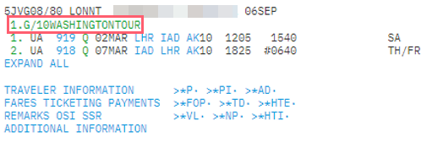
-
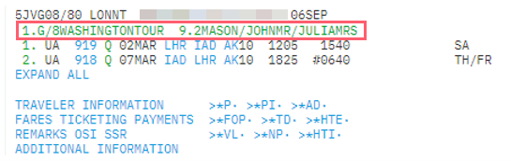
When the booking file has been ended, you can add names in the usual way.
Example: N.2MASON/JOHNMR/JULIAMRS
When you end the booking file, the names are added to the booking file, and the number against the group name is decreased.
Modify a group booking
You can modify the group name before you save the booking file.
Example: N.G/@10WASHINGTONGROUP
If you need to modify a group name after ending the record, the airline must first change the name in their system. You must then contact the Helpdesk to update the passive booking in Travelport+.
Retrieve a group booking
Use the following formats to retrieve a group booking:
*RECORD LOCATOR
*-NAME (individual passenger name)
*-G/GROUP NAME