Seats Workflows
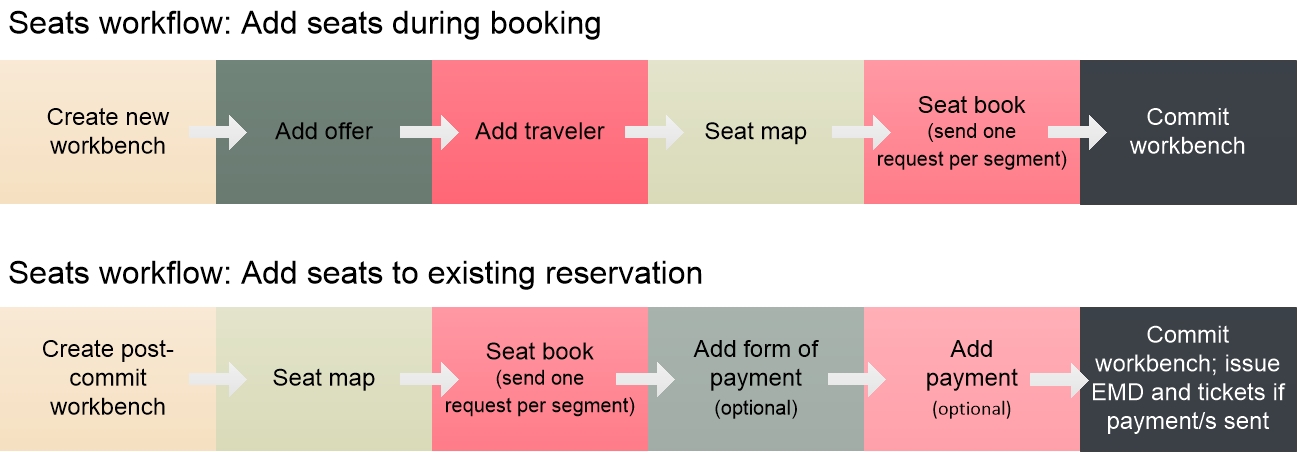
The diagram below illustrates workflows to add seats either during booking or to an existing reservation, and, optionally, to send payment and issue the EMD for the seats in the same session. For carriers that do support payment and EMD for seats in the same session as seat book, you can send payment in either the initial booking workbench or for an existing reservation.
Payment and EMD Workflow for Seats and Ancillaries
For all GDS and some NDC carriers, you must commit the booking workbench to confirm the seat or ancillary, and then create a new workbench to send payment and issue the EMD. Payment and EMD in the same workbench as booking is supported only for specific NDC carriers. For ancillary requirements by NDC carrier, see NDC capabilities by airline through TripServices API in the Travelport Knowledge Base. (If you need login assistance, see Knowledge Base NDC Resources.)
Seats are also supported in the NDC Instant Pay workflow by sending seat map and seat book requests after adding travelers.
Each box in the diagram represents one API call in the workflow.
Related Content: Seats Guide, Seat Map API Reference, Seat Book API Reference