Booking Workflow
The diagram below illustrates the typical TripServices API workflow to create a reservation, including all required and some optional steps. See All Book and Ticketing Workflows Diagrams for additional workflow options.
Seats and ancillaries can be added during booking, or in a separate workbench session, or later during ticketing, per the support noted in the Seats and Ancillaries guides.
Each box in the diagram represents one API call in the workflow.
Related Content: Booking Guide, All Book and Ticketing Workflows
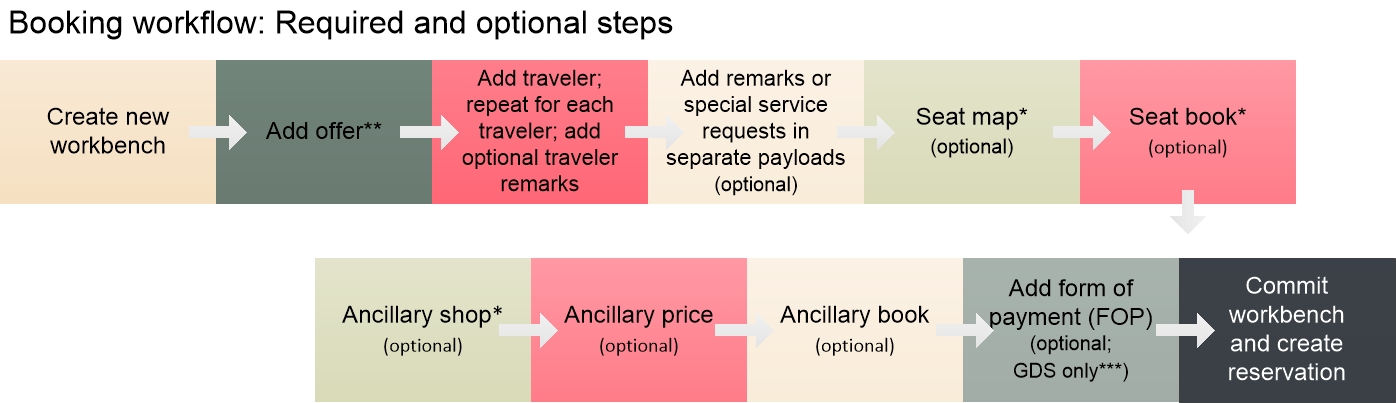
Form of payment (FOP) can be added during the booking workbench only for GDS. If FOP is added for NDC during booking it is not stored and must be sent again at ticketing. Or, for NDC only, you can send both FOP and payment in the same workbench session to book and ticket at once in the NDC Instant Pay flow.
When adding an unpriced segment An air segment without any associated fare or pricing, generally booked for availability versus cost. Shown in the UnpricedSegments object instead of the Offer object. GDS only; NDC does not use unpriced segments. to the workbench, use the Unpriced Segment API instead of Add Offer. Or, or if adding both an unpriced segment and an offer, send both Unpriced Segment and Add Offer .