Filed fares
HELP FF or H/ FF
Once an itinerary is priced, and a name exists in the booking file, it is stored and becomes known as a filed fare. To redisplay it, press *FF or enter *FF1.
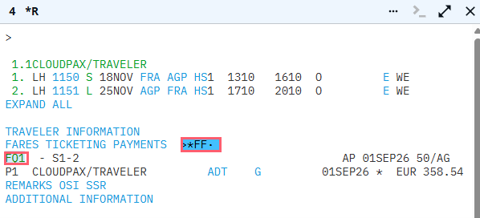
To check the information in the filed fare press FQ1.
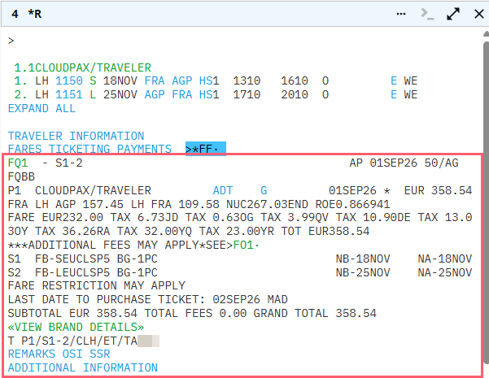
Note: The fare quote remains in the itinerary until it is canceled.
The following table lists the key components of the FQ response.
|
Component |
Description |
|---|---|
|
FQ1 - S1-2 |
Fare quote segment 1-2 |
|
AP G 01SEP26 50/AG |
Agent alert and date of fare quote |
|
FQBB |
Identifies the entry used to obtain the fare quote |
|
P1 CLOUDPAX/TRAVELER |
Passenger number and name |
|
G 01SEP26 |
Guarantee until midnight on 10MAY. Computer-generated price and date of fare quote. |
|
FRA LH AGP 157.45 LH FRA 109.58 NUC267.03END ROE0.866941SYD |
Linear fare construction END = end of fare construction and rate of exchange (ROE) |
|
FARE EUR232.00 TAX 6.73JD TAX 0.63OG TAX 3.99QV TAX 10.90DE TAX 13.0 3OY TAX 36.26RA TAX 32.00YQ TAX 23.00YR TOT EUR358.54 |
Base fare, taxes, and total fare In US itinerary you may see: ZP – USA flight segment tax XF – Passenger Facility Charge (USA airport tax) |
|
LAST DATE TO PURCHASE TICKET: 02SEP26 |
Latest date to purchase ticket for this fare |
|
FARE RESTRICTIONS MAY APPLY |
Endorsement box specifications |
|
T P1/S1-2/CLH/ET/TAPCC |
Ticketing line |
Note: If you make an FQ entry multiple times, each entry is recorded as an additional filed fare. However, you will not be able to end the transaction until you delete the duplicates.
Cancel filed fares
To view all filed fares in a booking, press *FF or enter *FF.
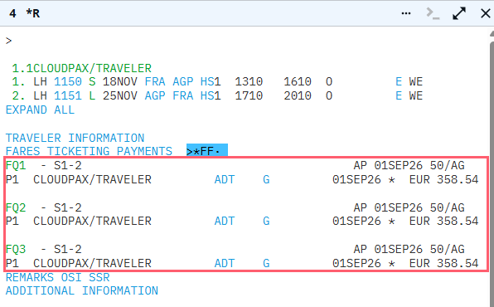
In this example, the Status on FQ1 displays I for Invalid. This stored fare was made when the itinerary was booked in an alternate class and guaranteed at that time. When the class was rebooked, and the new fare quoted, it invalidated the other FQ and stored the new fare with a G Guarantee status.
To cancel the filed fare, the function identifier is FX.
To remove the first fare quote, enter FX1.

You must cancel any duplicate fares before you end the transaction. The fares with I for Invalid status will be removed automatically at end transaction.

Other filed fare entries
|
Format |
Explanation |
|---|---|
|
*FF |
Display all filed fares |
|
*FF1 or *FF1P2 |
Display in detailed linear format |
|
Filed fare field will automatically be updated when a ticket is issued |
Ticketed |
|
FX1-3 FX1.3.5 FX1P2.4 FXALL |
Cancel filed fare 1, 2 and 3 Cancel filed fare 1, 3 and 5 Cancel filed fare 1 passengers 2 and 4 Cancel all filed fares |
|
FF1@R |
Restore fare for re-ticketing |
|
FF1BG40K |
Amended |
Note: You may amend the baggage allowance without altering the guarantee status of the fare.