Signing On
TravelportSmartpoint 12.0
Signing Off
Tip!  Machine translation for sign-on topics is available in the Knowledge Base in the Sign on to Smartpoint Desktop with multi-factor authentication (MFA) article.
Machine translation for sign-on topics is available in the Knowledge Base in the Sign on to Smartpoint Desktop with multi-factor authentication (MFA) article.
When you sign off, you end the session with both MyTravelport and the Travelport+ host connection.
You can sign off by either:
-
Entering SOF to close your Travelport+ session, but keep Smartpoint Desktop open.
-
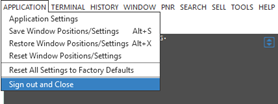
Selecting Sign Out and Close from the Settings menu to end both sessions, and exit from Smartpoint Desktop.
Tip! Sign Out and Close replaces the Quit Application menu item in earlier versions of Smartpoint.
 Flex Windows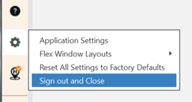
Next Steps
To sign on on to Travelport+ again, log in with your MyTravelport email and password.
Tip! Signing on with SON terminal formats is not available in Smartpoint 12.0. If you enter SOF to sign off, while Smartpoint remains open, the MyTravelport Welcome window automatically displays when you press ENTER in the Terminal window.
You do not need to sign on to the Travelport+ host again because your host credentials are maintained in your MyTravelport profile. However, if emulating, you may need to emulate again.