NDC segment status
As of February 5, 2026, all new or modified confirmed NDC bookings will have an HK segment status. This change allows Travelport+ to effectively manage flight disruptions by:
-
Automatically, updating airline-initiated changes to booking file (PNR), which eliminates the need to sync the booking.
-
Reducing manual intervention and improving the overall efficiency of disruption handling for travel agents and agencies.
-
Displaying updates in the familiar itinerary format, rather than requiring agents to rely on DI lines to identify changes.
-
Retaining information related to the flight changes in the DI lines will remain for the foreseeable future.
Bookings made prior to February 5, 2026 may have a ZK segment status.
Important: If an agent uses cryptic commands, such as @1HK, @HK, or @ALL on a schedule change by the airline, although the booking will be updated, NO message will be sent to the airline, and therefore the accepted change / cancellation will not be synced in the airline's system. If an agent does use a cryptic command they will receive the error message – “NDC STATUS CHANGE RESTRICTED-USE NDC APP”.
If your agency has automated scripts that use these cryptic entries for schedule changes, the scripts will need to be updated.
Effects of status change
-
Though the status will show HK, booking creation, modifications, or cancellations must still be made via
-
NDC bookings made prior to February 5, 2026 will continue to display a status of ZK. Any change to the air segments will update the status to HK. In the Booking File History, all segment changes before your agency opted in will show ZK. All changes after February 5, 2026 will show HK segment status.
-
Trip Activity Alert will send the HK status in the Air Segments facet of the notification.
-
The MIR will also display an NDC segment status of HK.
Booking file examples
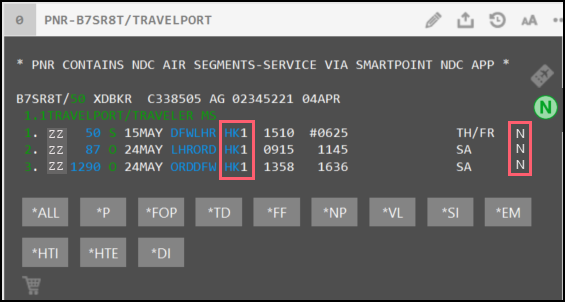
NDC segments display a status of HK and displays an N at the end of a terminal display for that segment.
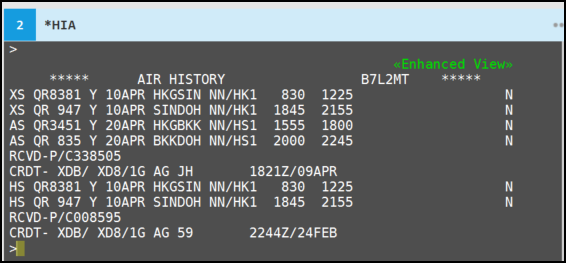
The N indicator also displays at the end of booking file history.
MIR display
In the MIR, NDC segments are identified with the value NDC:Y. The MIR will display NDC segments with a status of HK.
 MIR example
T51G773392022330000609APR251856 ZZ001TRAVEL AIRLINES       15MAY25CC

 XD8 XD802345221 B7SR8T          C33JHNJHAG04APR2500504APR25007

AUD0000001375002AUD00000000  00000000  00000000  00000000  00000000  0000

NYNYN5NNYAYA NNNX   AU

000000001000003000000001000001001000016000000000NDC:Y


A02TRAVELPORT/TRAVELER MS                      5575771492701         ADT

C35:NTD:04APR25


A0401ZZ001TRAVEL AIR  50S HK15MAY1510 0625 3DFWDALLAS       LHRLONDON/H

A0402ZZ001TRAVEL AIR  87O HK24MAY0915 1145 2LHRLONDON/HEATHRORDCHICAG

A0403ZZ001TRAVEL AIR1290O HK24MAY1358 1636 2ORDCHICAGO/O HARDFWDALLAS


A0701AUD     1375.00AUD     2556.10               AUDT1:   17.80AYT2:

IT:  747.00YR  185.30GB  106.50UB    5.90XA   11.20XY   11.50YC   15.90YQ

IT:  747.00YR  185.30GB  106.50UB    5.90XA   11.20XY   11.50YC   15.90YQ