|
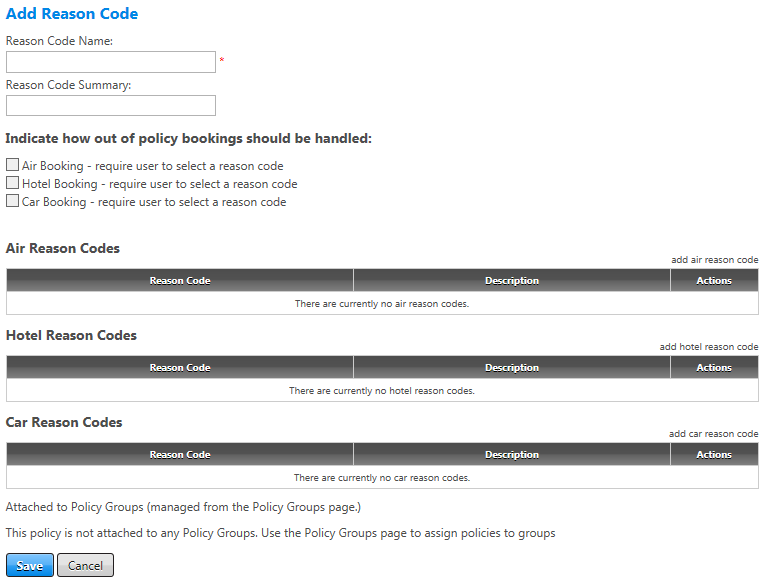
Reason Code Name
|
Edit the reason code name to attach to the policy group once completed. Field accepts up to 20 letters, numbers, and/or special characters.
|
|
Reason Code Summary
|
Enter a more detailed description of the group of reason codes.
|
| Indicate how out of policy bookings should be handled |
Select the individual checkboxes as needed if you want to require users to select a reason code for choosing out-of-policy air, hotel, and/or car travel before they can book that travel. Note that when you select one of these boxes, Universal Policy verifies that you have attached a corresponding reason code to the group; for example, if you select the Hotel Booking checkbox but have not added a hotel reason code, an error message displays when you save the page. |
|
add air reason code
|
Click link to add out-of-policy reason codes for air.
|
|
add hotel reason code
|
Click link to add out-of-policy reason codes for hotels.
|
|
add car reason code
|
Click link to add out-of-policy reason codes for rental cars.
|
|
Save/Cancel
|
Click the Save button to save changes. You can do this as you add each reason code to retain your changes as you go. Clicking the Cancel button discards any changes made since the last save.
|
 ) for that reason code on the Reason Codes screen. The Edit Reason Code screen appears. This screen allows you to change the individual air, car, and hotel reason codes attached to the reason code, and to set whether users must select a reason code before they can book out-of-policy travel.
  Show Screen