Notepad
Notepad provides a way to document quick notes for your own use.
Notepad color
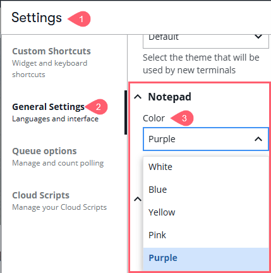
You can set the Notepad color from the Notepad more icon or from the General Settings tab.
From the Tools panel:
-
If the Tools panel is not open, click the Tools
 icon.
icon. -
In the Notepad header, press the
 icon and select a color.
From the settings icon on the top right:
-
In the Settings window, select the General Settings tab.
-
Scroll down and select your preferred notepad background color.
Your choice of background color and your notes will be retained until you choose to clear the notepad screen from the drop-down list or select another color.