Cancel or void traditional reservations in graphical view
For traditional (GDS) reservations, you have the following options for canceling and voiding tickets:
-
If you want to cancel all GDS reservations, including air (ticketed and non-ticketed), car, hotel, passive, and low cost carrier content, you can cancel from the Booking view menu.
-
To cancel or void a GDS offer, select the Cancel flight(s) button from the graphical booking file.
-
Open the graphical booking file.
-
Click on the flight in the Reservation section to display the flight information in the right panel.
-
Select Cancel flight(s) to void or cancel flights.
-
The options available to you depend on whether the flight is in the void period.
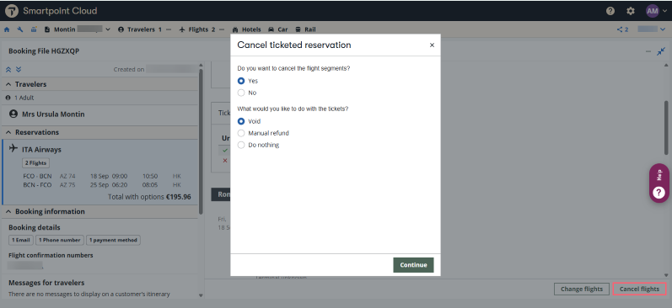
Void tickets
-
Select Yes to cancel flight segments.
If you select No, you can continue to void and get a refund. The flights remain in the booking file after void. You can then return to the booking file to cancel the flight(s) separately
-
Select Void (only available if within void period).
-
Select Continue.
-
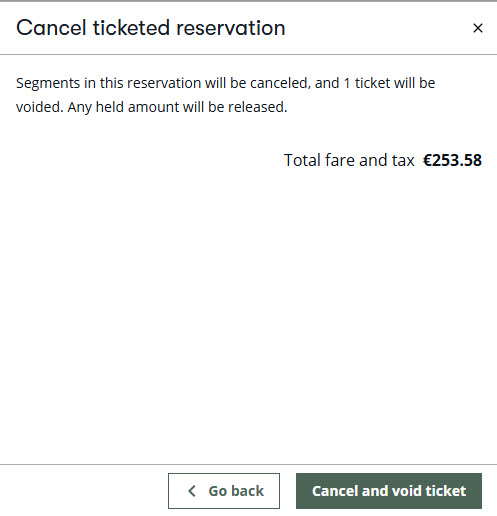
Information about the segments being canceled and/or the ticket being voided displays.
-
If you need to cancel flight segments, select Cancel and void ticket(s).
-
If you need to keep flight segments, select Void ticket(s).
-
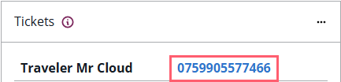
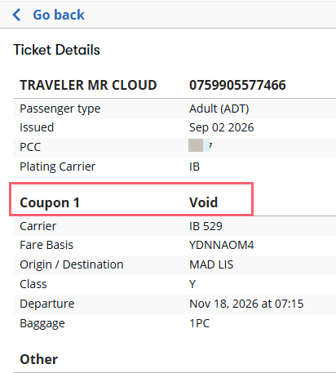
The voided tickets display in the booking file in the Tickets section under Inactive Tickets. Click on the blue ticket number to display ticket details, including fare, taxes, and fare construction.
Terminal view
In the terminal windows, the available option is using cryptic commands to void tickets.
Enter TRV/ followed by the ticket number: TRV/1231234567894
System response:

A confirmation message displays. Note that voids are final; there is no process to "unvoid" a previously voided ticket.