Best Practice: Polymorphism
This topic discusses developer best practices for polymorphism in the TripServices APIs.
In this topic:
What is Polymorphism?
Polymorphism is a fundamental concept in object-oriented programming (OOP) that allows software engineers to create flexible and reusable code. It is a technique that enables objects of different types to be treated as if they were the same type, by using a common interface. Polymorphism is an essential tool for creating maintainable and extensible software systems, as it enables developers to write code that can be reused across different parts of the system without the need for duplication.
Polymorphism is a Greek word meaning "many forms," and in programming, it refers to the ability of an object to take on many forms. Specifically, it allows different objects to be treated as if they were of the same type, even if they belong to different classes.
In OOP, objects are instances of classes, and each class has its own set of properties and methods. Polymorphism enables us to define a common interface that can be shared by multiple classes, even if those classes have different implementations of the interface.
Types of Polymorphism
Software development has two types of polymorphism: compile-time polymorphism and runtime polymorphism.
Compile-time Polymorphism
Compile-time polymorphism, also known as static polymorphism, occurs when the behavior of a method is determined at compile time-based on the type of arguments passed to it. In other words, the compiler selects the appropriate method to be called based on the static types of the objects involved.
Compile-time polymorphism is typically implemented through method overloading, which allows multiple methods to have the same name but different parameter types. For example, in Java, we can define two methods with the same name "add" but with different parameter types, such as "int add(int x, int y)" and "double add(double x, double y)".
Runtime Polymorphism
Runtime polymorphism, also known as dynamic polymorphism, occurs when the behavior of a method is determined at runtime based on the type of the object that the method is called on. In other words, the method that is called depends on the runtime type of the object, not the static type.
Runtime polymorphism is typically implemented through method overriding, which allows a subclass to provide a different implementation of a method that is already defined in its superclass. For example, in Java, we can define a class "Animal" with a method "makeSound()", and then define a subclass "Dog" that overrides the "makeSound()" method with its own implementation.
Benefits of Polymorphism
Polymorphism provides several benefits to software development, including:
-
Code reusability: Polymorphism enables software engineers to write code that can be reused across different parts of the system without the need for duplication.
-
Flexibility: Polymorphism enables objects of different types to be treated as if they were the same type, which makes the code more flexible and adaptable to changing requirements.
-
Encapsulation: Polymorphism enables software engineers to hide the implementation details of an object behind a common interface, which promotes encapsulation and reduces the complexity of the code.
-
Extensibility: Polymorphism enables software engineers to add new functionality to a system without modifying the existing code, which makes the system more extensible and maintainable.
How Does Polymorphism Work?
Polymorphism is typically implemented through inheritance and method overriding. Inheritance is the process by which a subclass (or child class) inherits the properties and methods of its superclass (or parent class), while method overriding allows a subclass to provide its own implementation of a method that is already defined in its superclass.
When a superclass defines a method, it can be called by any instance of that class or any of its subclasses. However, when a subclass overrides that method, it provides its own implementation of the method, which can then be called by instances of that subclass or any of its subclasses.
Here's an example to illustrate this:
class Animal {

  public void makeSound() {

    System.out.println("Generic animal sound");

  }

}


class Dog extends Animal {

  public void makeSound() {

    System.out.println("Woof!");

  }

}


class Cat extends Animal {

  public void makeSound() {

    System.out.println("Meow!");

  }

}


public class Main {

  public static void main(String[] args) {

    Animal myDog = new Dog();

    Animal myCat = new Cat();


    myDog.makeSound(); // Output: "Woof!"

    myCat.makeSound(); // Output: "Meow!"

  }

}
In this example, we have an Animal class with a makeSound() method that prints a generic animal sound. We also have two subclasses, Dog and Cat, that override the makeSound() method with their own implementations.
In the main method, we create instances of both Dog and Cat and store them in variables of type Animal. When we call the makeSound() method on these instances, the implementation of the method that is called depends on the actual type of the object, not the declared type of the variable.
So, even though both myDog and myCat are declared as type Animal, their actual types are Dog and Cat, respectively, and so the makeSound() method that is called is the one defined in the appropriate subclass.
Polymorphism is a powerful technique in software development that enables software engineers to create flexible and reusable code. It provides several benefits, including code reusability, flexibility, encapsulation, and extensibility. By using polymorphism, software engineers can write code that is more maintainable, extensible, and adaptable to changing requirements. Now let’s take a look at using polymorphism with Travelport API.
Polymorphism in OpenAPI Swagger
Travelport uses version 3 of the OpenAPI, where polymorphism is accomplished by using a discriminator in the base component schema, and “allOf” in the sub-schemas.
In the example swagger below AlbumID is the base schema, and has a discriminator named “objectType.”
The Album swagger definition extends AlbumID by using the “allOf” keyword and referencing the AlbumID swagger definition.
The AlbumDetails swagger definition extends Album by using the “allOf” keyword and referencing the Album swagger definition.
At runtime the objectType discriminator must be set to the swagger type that is used to set the data, and to read the data. The Json unmarshaller reads the objectType value and uses that type to unmarshall the data into. The Java class must be in the classpath.
openapi: 3.0.0


#######################

# Optional info section

#######################

info:

  title: Album

  description: Album

  version: '1.0.0'


components:

  schemas:

    AlbumID:

      type: object

      properties:

        objectType:

          type: string

        id:

          type: string

          example: 12345

        AlbumRef:

          type: string

        Identifier:

          $ref: 'http://swaggerhub.travelport.com/v1/domains/zzzODPlusModel/Common/11.8.0#/components/schemas/Identifier'

      required:

        - objectType

      discriminator:

        propertyName: objectType


    Album:

      allOf:

        - $ref: '#/components/schemas/AlbumID'

        - type: object

        - properties:

            Title:

              description: The title of the Album

              type: string

              maxLength: 512

              example: Ten Summoner's Tales

            Artist:

              $ref: 'http://swaggerhub.travelport.com/v1/domains/ODBCModel/Artist/1.0.0#/components/schemas/ArtistID'

            Song:

              description: The Songs that are on the Album

              type: array

              items:

                $ref: 'http://swaggerhub.travelport.com/v1/domains/ODBCModel/Song/1.0.0#/components/schemas/SongID'

              maxItems: 100

              minItems: 1

          required:

            - Title

            - Artist

            - Song


    AlbumDetail:

      allOf:

        - $ref: '#/components/schemas/Album'

        - type: object

        - properties:

            ReleaseDate:

              description: The release date of the Album

              type: string

              format: date-time

              example: 25 February 1993

            Studio:

              description: The studio where the Album was recorded

              type: string

              maxLength: 512

              example: Lake House, Wiltshire, England

            Genre:

              description: The genre, style, of the music on the Album

              type: string

              example: Pop rock

            Label:

              description: The record label company that published the Album

              type: string

              maxLength: 512

              example: A&M Records

            Producer:

              description: The producer of the Album

              type: string

              maxLength: 512

              example: Sting, Hugh Padgham
The generated code for Java for these three swagger definitions that define inheritance is shown below. Note the Json annotations that describe the classes that can inherit from AlbumID, and the objectType discriminator.
-
@JsonTypeInfo – defines the field name of the discriminator, which is objecType in this example
-
@JsonSubTypes – the Java classes that can extend AlbumID, which includes Album and AlbumDetail
-
@JsonTypeId – the discriminator field that contains the name of the object type
-
@JsonProperty – non-discriminator fields of the class, which are the properties defined in the OpenAPI swagger file
@Validated

@jakarta.annotation.Generated(value = "io.swagger.codegen.v3.generators.java.SpringCodegen", date = "2023-03-20T14:28:22.289210200-06:00[America/Denver]")

@JsonTypeInfo(use = JsonTypeInfo.Id.NAME, include = JsonTypeInfo.As.PROPERTY, property = "objectType", visible = true )

@JsonSubTypes({

        @JsonSubTypes.Type(value = Album.class, name = "Album"),

        @JsonSubTypes.Type(value = AlbumDetail.class, name = "AlbumDetail"),

})

public class AlbumID   {

  @JsonTypeId

  private String objectType = null;


  @JsonProperty("id")

  private String id = null;


  @JsonProperty("AlbumRef")

  private String albumRef = null;


  @JsonProperty("Identifier")

  private Identifier identifier = null;


@Validated

@jakarta.annotation.Generated(value = "io.swagger.codegen.v3.generators.java.SpringCodegen", date = "2023-03-20T14:28:22.289210200-06:00[America/Denver]")

public class Album extends AlbumID  {

  @JsonProperty("Title")

  private String title = null;


  @JsonProperty("Artist")

  private ArtistID artist = null;


  @JsonProperty("Song")

  @Valid

  private List<SongID> song = new ArrayList<>();


@jakarta.annotation.Generated(value = "io.swagger.codegen.v3.generators.java.SpringCodegen", date = "2023-03-20T14:28:22.289210200-06:00[America/Denver]")

public class AlbumDetail extends Album  {

  @JsonProperty("ReleaseDate")

  private OffsetDateTime releaseDate = null;


  @JsonProperty("Studio")

  private String studio = null;


  @JsonProperty("Genre")

  private String genre = null;


  @JsonProperty("Label")

  private String label = null;


  @JsonProperty("Producer")

  private String producer = null;
Polymorphism and Inheritance with Travelport API
When using the @type in your code be aware that you are unable to change it. For example, say you are using @type = Flight as the base facet. The initial release of the API just returned @type = Flight. In a later implementation when the API would return additional fields they were only available in FlightDetails. For instance, this can cause an unexpected issue with a GraphQL implementation. Which only expected the @type to equal Flight (i.e. @type=Flight). Instead of expecting a Flight Object and being able to accept any facet (i.e. @type=FlightDetails instead of @type=Flight) that is returned in the API response.
There are also compile issues that are caused by the @type. Since the @ symbol is a special character in most programming languages. The compilers tend to throw an error when it is being used outside of an annotation. Some compilers will change the symbol automatically, unfortunately, not all of them do this. As an example of an error see figure 1 below.
This known error occurs with some of the code generation tools available.
Here is an example of an error:
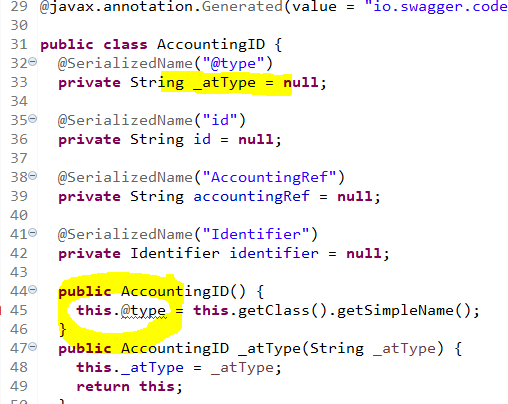
To solve this problem a developer will need to copy the affected code and manually make the required changes. By changing the “@type” to “_atType” will help to remove all errors related to this issue.
Another solution is to use the Maven plugin maven-replacer-plugin to correct this.
 <plugin>

<groupId>com.google.code.maven-replacer-plugin</groupId>

<artifactId>replacer</artifactId>

<version>1.5.3</version>

<executions>

  <execution>

       <phase>generate-sources</phase>

       <goals>

         <goal>replace</goal>

       </goals>

  </execution>

</executions>

<configuration>

  <includes>

       <include>${generated-sources-path}/${generated-sources-java-path}/**/*.java</include>

  </includes>

  <regex>false</regex>

  <replacements>

       <replacement>

        <token>this.@type</token>

        <value>this._atType</value>

       </replacement>

  </replacements>

</configuration>

</plugin>
Another known error with code generation is with the Spring Boot Jersey code generation of the swagger-codegen-maven-plugin, which incorrectly generates the Json annotations for polymorphism and inheritance.
The incorrect generated code has a @JsonProperty annotation for the discriminator field, which looks like this:
@jakarta.annotation.Generated(value = "io.swagger.codegen.v3.generators.java.JavaJerseyServerCodegen", date = "2023-03-22T06:24:15.436833300-06:00[America/Denver]")public class AlbumID   {

  @JsonProperty("objectType")

  private String objectType = null;
Rather than using @JsonProperty, @JsonTypeId should be used for the discriminator field, as well as needing additional class annotations of @JsonTypeInfo and @JsonSubTypes.
The @JsonSubTypes annotation should have a list of the valid types that can extend the base ID facet type. In the example below, the Album and AlbumDetail types are valid subtypes of the AlbumID type.
@javax.annotation.Generated(value = "io.swagger.codegen.v3.generators.java.JavaJerseyServerCodegen",

    date = "2023-02-17T08:08:55.595795400-07:00[America/Denver]")

@JsonTypeInfo(use = JsonTypeInfo.Id.NAME, include = JsonTypeInfo.As.PROPERTY,

    property = "objectType", visible = true)

@JsonSubTypes({@JsonSubTypes.Type(value = Album.class, name = "Album"),

    @JsonSubTypes.Type(value = AlbumDetail.class, name = "AlbumDetail"),})

public class AlbumID {

  @JsonTypeId

  private String objectType = null;
The completely manual solution to fix the incorrect generated code is to copy the generate Java source file into the service project that is using it (keeping the exact same package name of course), and modifying the code to have the correct annotations, which is described above.
To automate the correction of the incorrect code generation, the replacer plugin can be used. To automate, the base class of the polymorphism/inheritance class names must be known. The classes are the ID facet base class for the business object. They should have “ID” for the suffix of the class name. For example:
-
AlbumID
-
ArtistID
-
SongID
 <plugin>

                <groupId>com.google.code.maven-replacer-plugin</groupId>

                <artifactId>replacer</artifactId>

                <version>1.5.3</version>

                <executions>

                  <execution>

                    <phase>generate-sources</phase>

                    <goals>

                      <goal>replace</goal>

                    </goals>

                  </execution>

                </executions>

                <configuration>

                  <includes>

                    <include>${generated-sources-path}/${generated-sources-java-path}/**/*.java</include>

                  </includes>

                  <regex>false</regex>

                  <replacements>

                    <!-- for ID facet base class polymorphism/inheritance code generation bug -->

                    <replacement>

                      <token>@JsonProperty("objectType")</token>

                      <value>@JsonTypeId</value>

                    </replacement>

                    <replacement>

                      <token>)public class AlbumID</token>

                      <value>)

@JsonTypeInfo(use = JsonTypeInfo.Id.NAME, include = JsonTypeInfo.As.PROPERTY,

    property = "objectType", visible = true)

@JsonSubTypes({@JsonSubTypes.Type(value = Album.class, name = "Album"),

    @JsonSubTypes.Type(value = AlbumDetail.class, name = "AlbumDetail")})

public class AlbumID</value>

                    </replacement>

                    <replacement>

                      <token>)public class ArtistID</token>

                      <value>)

@JsonTypeInfo(use = JsonTypeInfo.Id.NAME, include = JsonTypeInfo.As.PROPERTY,

    property = "objectType", visible = true)

@JsonSubTypes({@JsonSubTypes.Type(value = Artist.class, name = "Artist")})

public class ArtistID</value>

                    </replacement>

                    <replacement>

                      <token>)public class SongID</token>

                      <value>)

@JsonTypeInfo(use = JsonTypeInfo.Id.NAME, include = JsonTypeInfo.As.PROPERTY,

    property = "objectType", visible = true)

@JsonSubTypes({@JsonSubTypes.Type(value = Song.class, name = "Song")})

public class SongID</value>

                    </replacement>

                  </replacements>

                </configuration>

              </plugin>